平台能力集成
Host SDK 支持接入方覆写部分开放给小游戏开发者的 JS 接口以集成平台方登录 SDK、广告 SDK、支付 SDK 等功能。 接入 Host SDK 的开发者可以通过 CustomCommand 接口 接入定制功能。
1 登录 SDK
1.1 登录组件接口列表
Host SDK 给小游戏开发者提供了的登录 JS 接口如下。
-
tj.login
- 输入参数: Object args
属性 类型 必填 说明 timeout number N 超时时间,单位ms success function N 接口调用成功的回调函数 fail function N 接口调用失败的回调函数 complete function N 接口调用结束的回调函数(调用成功、失败都会执行) - args.success 回调函数参数: Object res
属性 类型 说明 code string 调用接口获取登录凭证(code)
登录能力可通过覆写 tj.login 接口实现。
tj.login = function (obj) {
    tj.customCommand({
        success: function(res) {
            let resObj = JSON.parse(res);
            obj.success(resObj);
        },
        fail: function(res) {
            let apiRes = {
                errMsg: res.errorMsg,
                errno: res.errorCode
            };
            obj.fail(apiRes);

        },
        complete: function() {
            obj.complete();
        }
    }, "loginUnity");
};
代码中同样使用 CustomCommand 执行 Java 中的 Native Func loginUnity(),loginUnity() 的主要功能是通过平台自身的登录 SDK 获取 Code 并返回给宿主,宿主将其传递给游戏后,游戏可通过 Code2Session() 换取用户信息。
在多进程游戏的场景下,如果用户在主进程已经登录,则可以使用 AIDL 或其他进程间通信方式从游戏进程向主进程发起获取 Code 的请求,并由主进程统一返回 Code。
hostHandle.setCustomCommandListener("loginUnity", ((customCommandHandle, bundle) -> {
    try {
        loginService.requesetLogin(new ILoginCallback.Stub() {
            @Override
            public void loginEnd(String code) {
                JSONObject loginRes = new JSONObject();
                try {
                    loginRes.put("code", code);
                } catch (Exception e) {
                    customCommandHandle.fail(1002, "Failed to serialize login result" + e.getMessage());
                }

                customCommandHandle.pushResult(loginRes.toString());
                customCommandHandle.success();
            }
        });
    } catch (RemoteException e) {
        customCommandHandle.fail(1001, "Failed to connect Login Service: " + e.getMessage());
    }
}));
1.2 登录全流程
登录全流程示意图如下:
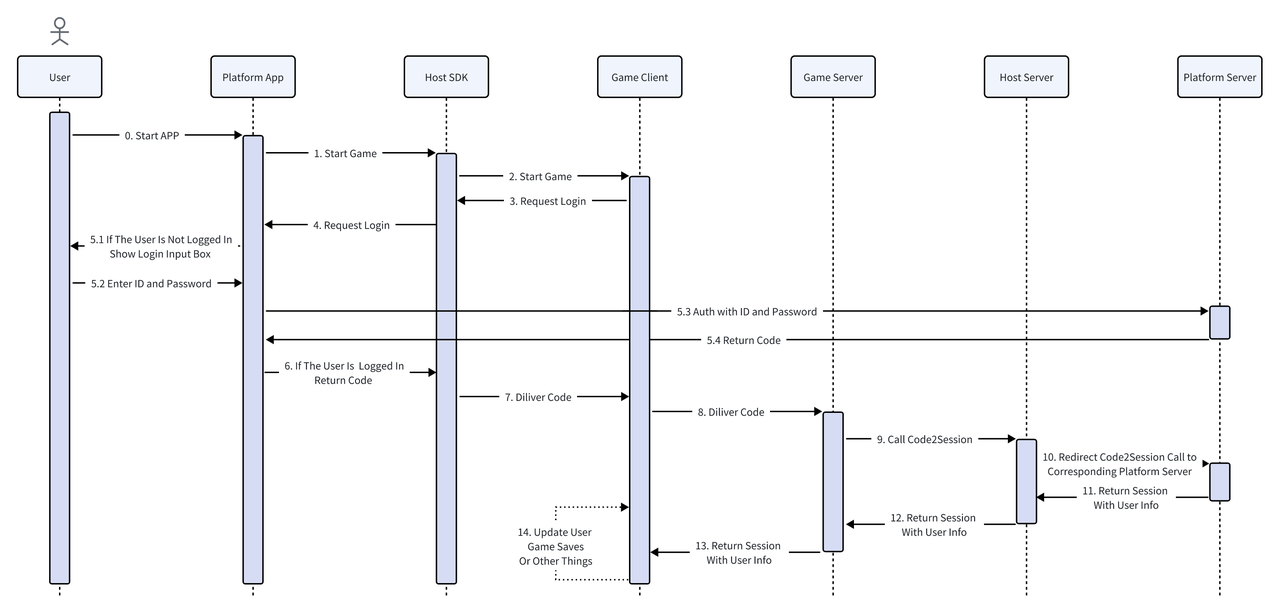
游戏客户端通过调用tj.login(流程图中的第3步)获取code后,需要通过JS code2session获取用户的登录信息,实现用户登录。
jscode2session
提供平台方的登录能力,宿主后台会将用户的登录凭证(code)传递给平台方,平台方需要根据该凭证返回用户的登录信息。
宿主后台会结合请求的上下文,将平台方返回的 uid 映射为游戏侧可用的 openid 和 unionid,同时转发 session_key 给游戏侧做为登录凭证。
请求示例:
GET /jscode2session?js_code={code} HTTP/1.1
Authorization: Bearer {service_token}
请求参数说明:
| 参数 | 说明 |
|---|---|
| js_code | 平台方登录凭证 |
| Authorization | 服务端令牌,格式为 Bearer {service_token} |
响应示例:
HTTP/1.1 200 OK
Content-Type: application/json

{
  "uid": "123456"
  "session_key": "abcdefg",
  "errcode": 0,
  "errmsg": "ok"
}
响应字段说明:
| 字段 | 说明 |
|---|---|
| uid | 平台方返回的用户唯一标识 |
| session_key | 平台方返回的 session_key |
| errcode | 错误码,0 表示成功 |
| errmsg | 错误信息 |
1.3 登录接口集成示例
接入方 App 可在工程内提供自定义 JS 文件用于覆写 JS 接口,并在设置游戏启动参数时指定自定义 JS 文件的路径。
auth.js 示例
// auth.js - Custom authentication implementation

// Override tj.login
tj.login = function(obj) {
  tj.customCommand('platformLogin', obj);
};

// Override tj.checkSession
tj.checkSession = function(obj) {
  tj.customCommand('checkSession', obj);
};

// Override tj.pluginLogin
tj.pluginLogin = function(obj) {
  tj.customCommand('pluginLogin', obj);
};
在宿主中注入登录 JS 文件
const { TJConstants } = require('webglhost-runtime-pc');
const path = require('path');

const options = {};
options[TJConstants.LAUNCH_KEY] = 'launch-key';
options[TJConstants.USER_ID] = 'user-123';

// Inject custom auth script
options[TJConstants.CUSTOM_SCRIPT_FILES] = [
  path.join(__dirname, 'custom-scripts', 'auth.js')
];

await gameHandle.setGameStartOptions(options);
在宿主中实现登录逻辑
// Setup custom command listeners for auth
gameHandle.setCustomCommandListener('platformLogin', (request, handle) => {
  // Call your platform's login SDK
  yourPlatformSDK.login()
    .then(result => {
      handle.success({
        code: result.authCode,
        userId: result.userId
      });
    })
    .catch(error => {
      handle.fail(20001, error.message);
    });
});

gameHandle.setCustomCommandListener('checkSession', (request, handle) => {
  // Check session validity
  yourPlatformSDK.checkSession()
    .then(() => {
      handle.success({});
    })
    .catch(error => {
      handle.fail(20002, 'Session expired');
    });
});

gameHandle.setCustomCommandListener('pluginLogin', (request, handle) => {
  // Handle plugin login
  yourPlatformSDK.pluginLogin()
    .then(result => {
      handle.success({
        code: result.authCode
      });
    })
    .catch(error => {
      handle.fail(20003, error.message);
    });
});
2 广告 SDK
2.1 广告组件接口列表
Host SDK 给小游戏开发者提供了的广告 JS 接口如下。
tj.createRewardedVideoAd()
返回值为RewardedVideoAd,暴露的方法有:
| 函数名 | 函数说明 | 返回值 |
|---|---|---|
| RewardedVideoAd.load() | 加载激励视频广告 | Promise
|
| RewardedVideoAd.show() | 显示激励视频广告 | Promise
|
| RewardedVideoAd.destroy() | 销毁激励视频广告实例 | |
| RewardedVideoAd.onLoad(function listener) | 监听激励视频广告加载事件。参数:function listener
| |
| RewardedVideoAd.offLoad(function listener) | 监听激励视频广告加载事件。参数:function listener
| |
| RewardedVideoAd.onError(function listener) | 监听激励视频错误事件。参数:function listener
| |
| RewardedVideoAd.offError(function listener) | 移除激励视频错误事件的监听函数参数:function listener
| |
| RewardedVideoAd.onClose(function listener) | 监听用户点击 关闭广告 按钮的事件。参数:function listener
| |
| RewardedVideoAd.offClose(function listener) | 移除用户点击 关闭广告 按钮的事件的监听函数参数:function listener
|
下面以 "创建激励视频广告" 为例子,介绍怎样覆盖广告接口,接入广告逻辑。
2.2 广告组件接口示例
tj.createRewardedVideoAd()
此接口用于创建激励视频广告组件,并返回 RewardedVideoAd 实例,实例暴露的部分方法有:
-
RewardedVideoAd.load()加载激励广告,返回一个 Promise -
RewardedVideoAd.onLoad(callback)接收函数作为参数,监听广告加载事件 -
RewardedVideoAd.offLoad(callback)移除广告加载事件的监听函数,不传参数则移除所有
Host SDK 并不内置广告功能,仅提供了 tj.createRewardedVideoAd() 的一个默认实现,此实现返回的 RewardedVideoAd 实例暴露的方法均为空实现,小游戏开发者调用 RewardedVideoAd.load() 并不能真实加载激励广告。
因此接入方 App 需要覆写此 tj.createRewardedVideoAd(),使得 RewardedVideoAd.load() 内调用 App 内接入的第三方广告 SDK 的加载接口,同理实现 RewardedVideoAd 暴露的其他接口以实现广告功能的集成。
2.3 接入第三方广告 SDK
以集成激励广告 API 为例,可参考以下 ad.js 实现:
ad.js 示例
// ad.js - Custom ad implementation

let rewardedVideoAdOnLoadCallbacks = [];
let rewardedVideoAdOnErrorCallbacks = [];
let rewardedVideoAdOnCloseCallbacks = [];

tj.createRewardedVideoAd = (obj) => {
  const adUnitId = obj.adUnitId;

  return {
    onLoad: (callback) => {
      console.info("[Host] invoke RewardedVideoAd.onLoad");
      if (callback && typeof callback === "function") {
        if (!rewardedVideoAdOnLoadCallbacks.includes(callback)) {
          rewardedVideoAdOnLoadCallbacks.push(callback);
        }
      }
    },

    load: () => {
      console.info("[Host] invoke RewardedVideoAd.load");

      return new Promise((resolve, reject) => {
        tj.customCommand("loadRewardAd", {
          adUnitId: adUnitId,
          success: function (res) {
            console.info("[Host] RewardedVideoAd.load success");
            resolve(res);
          },
          fail: function (obj) {
            console.info("[Host] RewardedVideoAd.load fail");
            reject(obj);
          },
          complete: function () {
            console.info("[Host] RewardedVideoAd.load complete");
          },
        });
      });
    },

    show: () => {
      console.info("[Host] invoke RewardedVideoAd.show");

      return new Promise((resolve, reject) => {
        tj.customCommand("showRewardAd", {
          adUnitId: adUnitId,
          success: function (res) {
            console.info("[Host] RewardedVideoAd.show success");
            resolve(res);
          },
          fail: function (obj) {
            console.info("[Host] RewardedVideoAd.show fail");
            reject(obj);
          },
        });
      });
    },

    offLoad: (callback) => {
      console.info("[Host] invoke RewardedVideoAd.offLoad");
      if (callback === undefined) {
        rewardedVideoAdOnLoadCallbacks = [];
      } else if (callback && typeof callback === "function") {
        rewardedVideoAdOnLoadCallbacks = rewardedVideoAdOnLoadCallbacks.filter(
          (cb) => cb !== callback
        );
      }
    },

    onError: (callback) => {
      console.info("[Host] invoke RewardedVideoAd.onError");
      if (callback && typeof callback === "function") {
        if (!rewardedVideoAdOnErrorCallbacks.includes(callback)) {
          rewardedVideoAdOnErrorCallbacks.push(callback);
        }
      }
    },

    offError: (callback) => {
      console.info("[Host] invoke RewardedVideoAd.offError");
      if (callback === undefined) {
        rewardedVideoAdOnErrorCallbacks = [];
      } else if (callback && typeof callback === "function") {
        rewardedVideoAdOnErrorCallbacks = rewardedVideoAdOnErrorCallbacks.filter(
          (cb) => cb !== callback
        );
      }
    },

    onClose: (callback) => {
      console.info("[Host] invoke RewardedVideoAd.onClose");
      if (callback && typeof callback === "function") {
        if (!rewardedVideoAdOnCloseCallbacks.includes(callback)) {
          rewardedVideoAdOnCloseCallbacks.push(callback);
        }
      }
    },

    offClose: (callback) => {
      console.info("[Host] invoke RewardedVideoAd.offClose");
      if (callback === undefined) {
        rewardedVideoAdOnCloseCallbacks = [];
      } else if (callback && typeof callback === "function") {
        rewardedVideoAdOnCloseCallbacks = rewardedVideoAdOnCloseCallbacks.filter(
          (cb) => cb !== callback
        );
      }
    },

    destroy: () => {
      console.info("[Host] invoke RewardedVideoAd.destroy");
      rewardedVideoAdOnLoadCallbacks = [];
      rewardedVideoAdOnErrorCallbacks = [];
      rewardedVideoAdOnCloseCallbacks = [];
    }
  };
};

// Callback functions to be called from host
rewardedVideoLoadCallback = () => {
  try {
    rewardedVideoAdOnLoadCallbacks.forEach((callback) => callback());
  } catch (error) {
    console.error("[Host] Error in rewardedVideoLoadCallback:", error);
  }
};

rewardedVideoErrorCallback = (error) => {
  try {
    rewardedVideoAdOnErrorCallbacks.forEach((callback) => callback(error));
  } catch (error) {
    console.error("[Host] Error in rewardedVideoErrorCallback:", error);
  }
};

rewardedVideoCloseCallback = (result) => {
  try {
    rewardedVideoAdOnCloseCallbacks.forEach((callback) => callback(result));
  } catch (error) {
    console.error("[Host] Error in rewardedVideoCloseCallback:", error);
  }
};
在宿主中注入广告 JS 文件
const { TJConstants } = require('webglhost-runtime-pc');
const path = require('path');

const options = {};
options[TJConstants.LAUNCH_KEY] = 'launch-key';
options[TJConstants.USER_ID] = 'user-123';

// Inject custom ad script
options[TJConstants.CUSTOM_SCRIPT_FILES] = [
  path.join(__dirname, 'custom-scripts', 'ad.js')
];

await gameHandle.setGameStartOptions(options);
在宿主中实现广告逻辑
// Setup custom command listeners for ads
gameHandle.setCustomCommandListener('loadRewardAd', (request, handle) => {
  const adUnitId = request.adUnitId;

  console.log('Loading reward ad:', adUnitId);

  // Call your ad SDK to load the ad
  yourAdSDK.loadRewardedVideo(adUnitId)
    .then(() => {
      handle.success({});

      // Notify JS that ad loaded successfully
      gameHandle.runCustomScript(`
        rewardedVideoLoadCallback();
      `, (result, error) => {
        if (error) {
          console.error('Error calling load callback:', error);
        }
      });
    })
    .catch(error => {
      handle.fail(30001, error.message);

      // Notify JS that ad load failed
      gameHandle.runCustomScript(`
        rewardedVideoErrorCallback({ errCode: 30001, errMsg: '${error.message}' });
      `, (result, error) => {
        if (error) {
          console.error('Error calling error callback:', error);
        }
      });
    });
});

gameHandle.setCustomCommandListener('showRewardAd', (request, handle) => {
  const adUnitId = request.adUnitId;

  console.log('Showing reward ad:', adUnitId);

  // Call your ad SDK to show the ad
  yourAdSDK.showRewardedVideo(adUnitId)
    .then(result => {
      handle.success({});

      // Notify JS when ad is closed
      const isAdWatched = result.isAdWatched; // User watched ad completely
      gameHandle.runCustomScript(`
        rewardedVideoCloseCallback({ isEnded: ${isAdWatched} });
      `, (result, error) => {
        if (error) {
          console.error('Error calling close callback:', error);
        }
      });
    })
    .catch(error => {
      handle.fail(30002, error.message);
    });
});
2.4 完整广告集成示例
const { TJHostHandle, TJConstants } = require('webglhost-runtime-pc');
const path = require('path');

class AdManager {
  constructor(gameHandle) {
    this.gameHandle = gameHandle;
    this.setupAdListeners();
  }

  setupAdListeners() {
    // Load ad listener
    this.gameHandle.setCustomCommandListener('loadRewardAd', (request, handle) => {
      this.handleLoadRewardAd(request, handle);
    });

    // Show ad listener
    this.gameHandle.setCustomCommandListener('showRewardAd', (request, handle) => {
      this.handleShowRewardAd(request, handle);
    });
  }

  async handleLoadRewardAd(request, handle) {
    const adUnitId = request.adUnitId;

    try {
      console.log(`Loading rewarded video ad: ${adUnitId}`);

      // Simulate ad loading (replace with actual ad SDK call)
      await this.simulateAdLoad(adUnitId);

      // Success callback to host
      handle.success({});

      // Notify JS layer that ad loaded
      this.notifyAdLoaded();

    } catch (error) {
      handle.fail(30001, error.message);
      this.notifyAdError(error);
    }
  }

  async handleShowRewardAd(request, handle) {
    const adUnitId = request.adUnitId;

    try {
      console.log(`Showing rewarded video ad: ${adUnitId}`);

      // Simulate ad showing (replace with actual ad SDK call)
      const result = await this.simulateAdShow(adUnitId);

      // Success callback to host
      handle.success({});

      // Notify JS layer that ad closed
      this.notifyAdClosed(result.isEnded);

    } catch (error) {
      handle.fail(30002, error.message);
      this.notifyAdError(error);
    }
  }

  notifyAdLoaded() {
    this.gameHandle.runCustomScript(`
      if (typeof rewardedVideoLoadCallback === 'function') {
        rewardedVideoLoadCallback();
      }
    `, (result, error) => {
      if (error) {
        console.error('Error notifying ad loaded:', error);
      }
    });
  }

  notifyAdError(error) {
    this.gameHandle.runCustomScript(`
      if (typeof rewardedVideoErrorCallback === 'function') {
        rewardedVideoErrorCallback({
          errCode: ${error.code || 30000},
          errMsg: '${error.message}'
        });
      }
    `, (result, err) => {
      if (err) {
        console.error('Error notifying ad error:', err);
      }
    });
  }

  notifyAdClosed(isEnded) {
    this.gameHandle.runCustomScript(`
      if (typeof rewardedVideoCloseCallback === 'function') {
        rewardedVideoCloseCallback({ isEnded: ${isEnded} });
      }
    `, (result, error) => {
      if (error) {
        console.error('Error notifying ad closed:', error);
      }
    });
  }

  // Simulate ad loading (replace with actual ad SDK integration)
  async simulateAdLoad(adUnitId) {
    return new Promise((resolve, reject) => {
      setTimeout(() => {
        console.log(`Ad ${adUnitId} loaded successfully`);
        resolve();
      }, 1000);
    });
  }

  // Simulate ad showing (replace with actual ad SDK integration)
  async simulateAdShow(adUnitId) {
    return new Promise((resolve, reject) => {
      setTimeout(() => {
        console.log(`Ad ${adUnitId} shown successfully`);
        // Simulate user watching ad completely
        resolve({ isEnded: true });
      }, 2000);
    });
  }
}

// Usage
async function initializeWithAds() {
  const hostHandle = await new Promise((resolve, reject) => {
    TJHostHandle.initialize('sdk-key', 'sdk-secret', (handle, error) => {
      if (error) reject(error);
      else resolve(handle);
    });
  });

  const gameHandle = await hostHandle.createGameHandle();

  // Initialize ad manager
  const adManager = new AdManager(gameHandle);

  // Setup game options with custom ad script
  const options = {
    [TJConstants.LAUNCH_KEY]: 'launch-key',
    [TJConstants.USER_ID]: 'user-123',
    [TJConstants.CUSTOM_SCRIPT_FILES]: [
      path.join(__dirname, 'custom-scripts', 'ad.js')
    ]
  };

  await gameHandle.setGameStartOptions(options);
  await gameHandle.start();
  await gameHandle.play();
}

initializeWithAds().catch(console.error);
3 支付 SDK
3.1 流程图
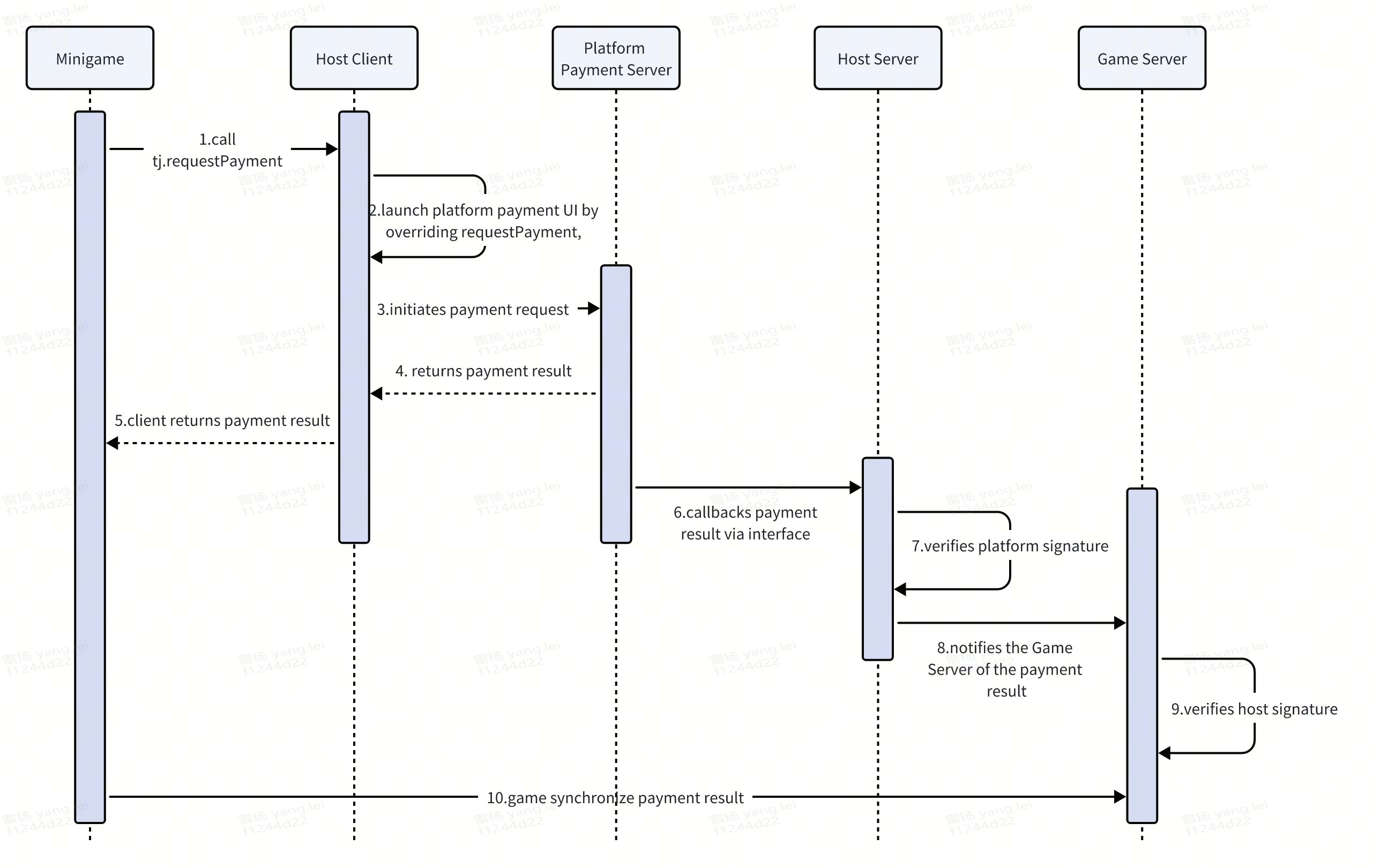
3.1.1 小游戏支付
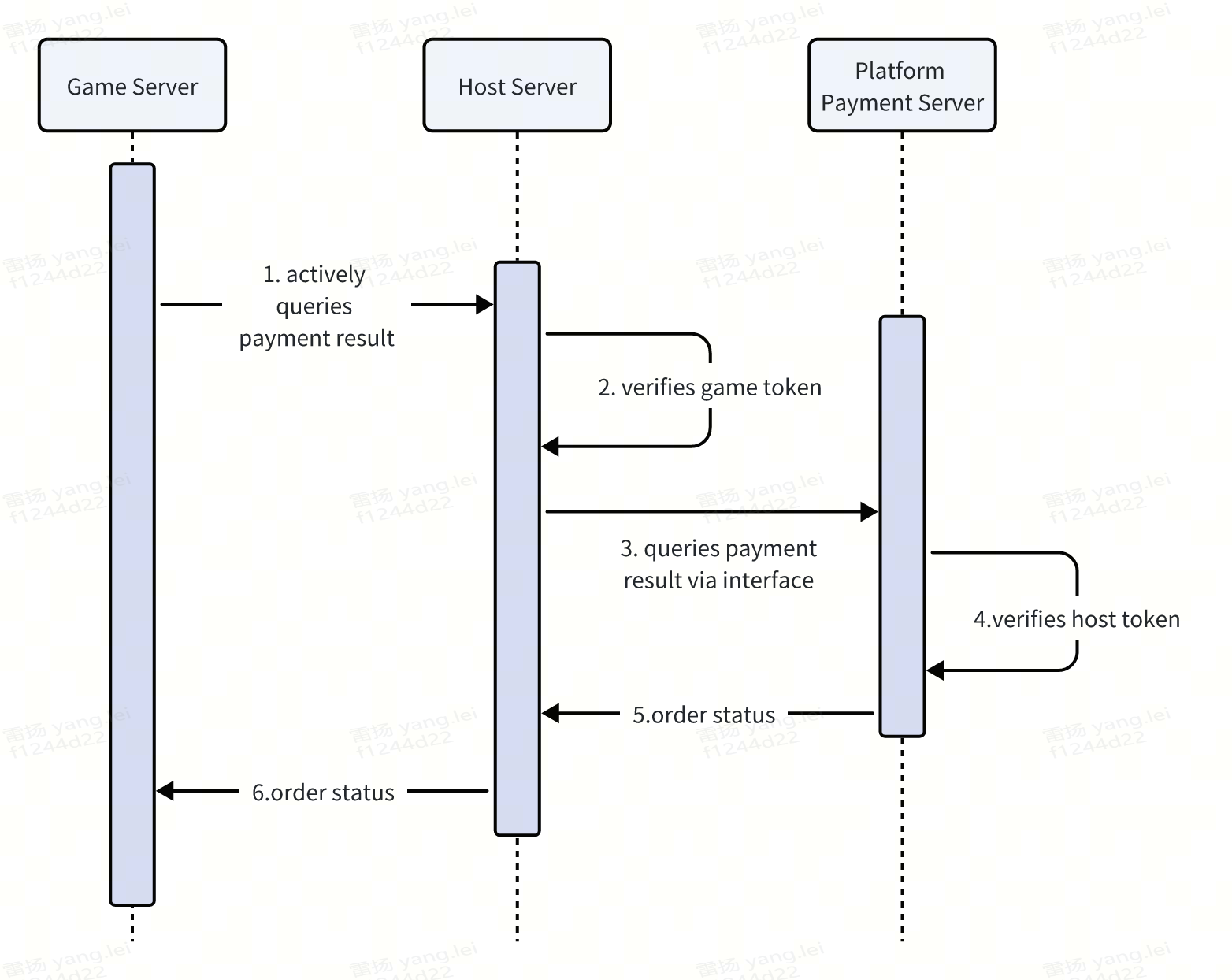
3.1.2 主动查询订单
3.2 客户端接口
tj.requestPayment(Object obj)
参数说明
| 属性名 | 类型 | 默认值 | 必填 | 说明 |
|---|---|---|---|---|
| mode | string | game | 是 | 支付的类型,枚举值
|
| env | number | 0 | 是 | 环境配置,枚举值
|
| currencyType | string | CNY | 是 | 币种,枚举值
|
| platform | string | 是 | 申请接入时的平台,android或者ios | |
| buyQuantity | number | 否 | 所购买的数量 | |
| zoneId | string | 1 | 否 | 游戏服务区 id,开发者自定义。游戏不分大区则默认填写"1" |
| customId | string | 是 | 游戏开发者自定义的唯一订单号,订单支付成功后通过服务端支付结果回调回传。必须具有唯一性,如果不传或重复传相同值,则会报错。 | |
| extraInfo | string | 否 | 游戏开发者自定义的其他信息,订单支付成功后通过服务端支付结果回调回传。字符串长度最大不能超过 256。 | |
| goodType | number | 2 | 否 | 支付场景,枚举值
|
| orderAmount | number | 是 | 代表道具现金价格,单位为【人民币分】 | |
| goodName | string | 是 | goodType为道具直购场景时,代表道具名称,长度限制小于等于10个字符,用于区分道具类型 | |
| options | map | 否 | 扩展参数,可以根据平台需求定制 | |
| success | function | 否 | 接口调用成功的回调函数 | |
| fail | function | 否 | 接口调用失败的回调函数 | |
| complete | function | 否 | 接口调用结束的回调函数(调用成功、失败都会执行) |
3.2.1 回调成功参数
Object类型,属性如下
| 属性名 | 类型 | 说明 |
|---|---|---|
| errMsg | string | requestPayment:ok |
3.2.2 回调失败参数
Object类型,属性如下
| 属性名 | 类型 | 说明 |
|---|---|---|
| errMsg | string | "requestPayment:fail " + 错误详情 |
| errCode | number | 错误码,对应信息可参考错误码说明 |
3.2.3 回调结束参数
Object类型,属性如下
| 属性名 | 类型 | 说明 |
|---|---|---|
| errMsg | string | requestPayment:ok |
3.2.4 错误码说明
根据实际支持情况映射
| errCode | errMsg | 说明 |
|---|---|---|
| -1 | requestPayment:fail 支付失败 | 用户支付失败 |
| -1 | requestPayment:fail internal error | 小游戏框架内部错误 |
| -2 | requestPayment:fail 支付取消 | 用户取消支付 |
| 3 | requestPayment:fail error_tip_start_cash_register_fail | 拉起收银台失败,如遇小游戏框架内部错误 |
| 4 | requestPayment:fail 网络异常 | 用户网络异常 |
| -15002 | requestPayment:fail 请求参数不合法 | 请求参数不合法 |
| -15006 | requestPayment:fail app 没有支付权限 | 请确认是否设置游戏币汇率 |
| -15098 | requestPayment:fail 当前用户未通过实名认证 | 当前用户未通过实名认证 |
| -15099 | requestPayment:fail 当前用户累计支付金额超过限制 | 当前用户累计支付金额超过限制 |
| -15101 | requestPayment:fail customId 为空或者不唯一 | customId 为空或者不唯一 |
| -16000 | requestPayment:fail 用户未登录 | 用户未登录 |
| -20002 | requestPayment:fail 交易存在风险 | 交易存在风险,被风控策略拦截 |
| 21113 | requestPayment:fail face authentication failed | 检测到疑似未成年下单,拉起人脸核验,人脸验证不通过 |
3.2.5 示例代码
tj.requestPayment({
    mode: 'game',
    env: 0,
    currencyType: 'CNY',
    platform: 'ios',
    zoneId: '1',
    customId: 'order_' + Date.now(),
    extraInfo: JSON.stringify({
      orderId: 'test_order_' + Date.now(),
      userId: '10001'
    }),
    goodType: 2,
    orderAmount: 100,
    goodName: '去广告',
    options: {
        'PRODUCT_CODE': '1001'
    },
    success: function success(res) {
      console.log('[游戏JS端] 支付成功:', res);
      tj.showToast({
        title: '支付成功,再来一局!',
        duration: 2000
      });
    },
    fail: function fail(err) {
      if (err.errCode && err.errCode == -2) {
        console.log('[游戏JS端] 用户取消支付');
        tj.showToast({
          title: '支付取消,请重新支付!',
          duration: 2000
        });
      } else {
        console.error('[游戏JS端] 支付失败:', err);
        tj.showToast({
          title: '支付失败,请重试!',
          duration: 2000
        });
      }
    },
    complete: function complete(res) {
      console.log('[游戏JS端] 支付流程结束:', res);
    }
  })
3.3 服务端接口
3.3.1 服务端回调接口
支付成功后,平台方服务端向宿主服务端发送支付成功回调。宿主服务端在验签后将回调发送给游戏服务端。
3.3.1.1 回调地址
POST https://minihost.tuanjie.cn/game-api/v1/payment/callback
3.3.1.2 请求参数
| 参数名 | 类型 | 说明 |
|---|---|---|
| timestamp | string | 时间戳 |
| nonce | string | 随机数 |
| msg | string | Json string类型的支付结果信息,参见2.1.3PaymentInfo对象 |
| signature | string | 签名,签名算法参见2.1.4签名部分 |
3.3.1.3 PaymentInfo
| 参数名 | 类型 | 说明 |
|---|---|---|
| appid | string | 平台方小游戏appid |
| cp_orderno | string | 开发者自定义订单号,tj.requestPayment方法中的customId参数 |
| cp_extra | string | 开发者传的额外参数,tj.requestPayment方法中的extra参数 |
| order_no_channel | string | 小游戏后台交易单号 |
| amount_cent | int64 | 订单金额,单位人民币分 |
| amount_coin | int64 | 购买游戏币数量,平台方集成中不涉及该场景,可忽略 |
| currency | string | 支付币种,CNY 人民币,DIAMOND 钻石 |
3.3.1.4 签名
根据 token,timestamp,nonce,msg ,使用 SHA1 算法生成 signature,与平台方的服务端返回的 signature 对比。
前置条件:在关联游戏时,平台方需要将token传递给宿主,用于签名校验
golang示例代码:
sortedString := make([]string, 4)
sortedString = append(sortedString, token)
sortedString = append(sortedString, timestamp)
sortedString = append(sortedString, nonce)
sortedString = append(sortedString, string(msg))
sort.Strings(sortedString)h := sha1.New()
h.Write([]byte(strings.Join(sortedString, "")))_signature := h.Sum(nil)
3.3.1.5 响应
宿主服务器返回200状态码,作为成功响应。若返回 http 状态码非200,表示通知失败,需要进行重试。
3.3.2 主动查询订单接口
服务端支付回调可能由于网络异常等原因导致无法 100%触达,开发者可以通过该接口主动回查订单状态,防止超发漏发。开发者向宿主服务端发送查询订单请求,宿主封装后向平台方服务端发送查询订单请求。
3.3.2.1 接口地址
由平台方提供
3.3.2.2 请求参数
| 参数名 | 类型 | 说明 |
|---|---|---|
| token | string | 双方约定服务端token |
| orderno | string | cp 自定义订单号,在下单的时候传入,tj.requestPayment方法中的customId参数 |
3.3.2.3 响应
| 参数名 | 类型 | 说明 |
|---|---|---|
| status | string | 支付状态。success 表示支付成功且发币到账,unsuccess 表示支付失败 |
3.3.2.4 鉴权
请求需包含双方约定好的服务器令牌,放在Auhthorization header里,格式形如
Bearer {service_token}
3.4 支付接口集成示例
payment.js 示例
// payment.js - Custom payment implementation

// Override tj.requestPayment
tj.requestPayment = function(obj) {
  tj.customCommand('platformPayment', obj);
};

// Override tj.requestVirtualPayment
tj.requestVirtualPayment = function(obj) {
  tj.customCommand('virtualPayment', obj);
};
在宿主中实现支付逻辑
const { TJConstants } = require('webglhost-runtime-pc');
const path = require('path');

// Setup payment options
const options = {};
options[TJConstants.LAUNCH_KEY] = 'launch-key';
options[TJConstants.USER_ID] = 'user-123';
options[TJConstants.CUSTOM_SCRIPT_FILES] = [
  path.join(__dirname, 'custom-scripts', 'payment.js')
];

await gameHandle.setGameStartOptions(options);

// Setup payment listeners
gameHandle.setCustomCommandListener('platformPayment', (request, handle) => {
  // Call your payment SDK
  yourPaymentSDK.requestPayment({
    orderId: request.orderId,
    amount: request.amount,
    description: request.description
  })
    .then(result => {
      handle.success({
        transactionId: result.transactionId,
        status: 'success'
      });
    })
    .catch(error => {
      handle.fail(40001, error.message);
    });
});

gameHandle.setCustomCommandListener('virtualPayment', (request, handle) => {
  // Handle virtual payment
  yourPaymentSDK.requestVirtualPayment(request)
    .then(result => {
      handle.success(result);
    })
    .catch(error => {
      handle.fail(40002, error.message);
    });
});
4 完整平台集成示例
const { TJHostHandle, TJConstants } = require('webglhost-runtime-pc');
const path = require('path');

class PlatformIntegrationManager {
  constructor(gameHandle) {
    this.gameHandle = gameHandle;
    this.setupAllListeners();
  }

  setupAllListeners() {
    this.setupAuthListeners();
    this.setupAdListeners();
    this.setupPaymentListeners();
  }

  // Authentication
  setupAuthListeners() {
    this.gameHandle.setCustomCommandListener('platformLogin', (request, handle) => {
      this.handleLogin(request, handle);
    });

    this.gameHandle.setCustomCommandListener('checkSession', (request, handle) => {
      this.handleCheckSession(request, handle);
    });
  }

  async handleLogin(request, handle) {
    try {
      const result = await yourPlatformSDK.login();
      handle.success({
        code: result.authCode,
        userId: result.userId
      });
    } catch (error) {
      handle.fail(20001, error.message);
    }
  }

  async handleCheckSession(request, handle) {
    try {
      await yourPlatformSDK.checkSession();
      handle.success({});
    } catch (error) {
      handle.fail(20002, 'Session expired');
    }
  }

  // Ads
  setupAdListeners() {
    this.gameHandle.setCustomCommandListener('loadRewardAd', (request, handle) => {
      this.handleLoadAd(request, handle);
    });

    this.gameHandle.setCustomCommandListener('showRewardAd', (request, handle) => {
      this.handleShowAd(request, handle);
    });
  }

  async handleLoadAd(request, handle) {
    try {
      await yourAdSDK.loadAd(request.adUnitId);
      handle.success({});
      this.notifyAdLoaded();
    } catch (error) {
      handle.fail(30001, error.message);
    }
  }

  async handleShowAd(request, handle) {
    try {
      const result = await yourAdSDK.showAd(request.adUnitId);
      handle.success({});
      this.notifyAdClosed(result.isEnded);
    } catch (error) {
      handle.fail(30002, error.message);
    }
  }

  notifyAdLoaded() {
    this.gameHandle.runCustomScript('rewardedVideoLoadCallback();', () => {});
  }

  notifyAdClosed(isEnded) {
    this.gameHandle.runCustomScript(
      `rewardedVideoCloseCallback({ isEnded: ${isEnded} });`,
      () => {}
    );
  }

  // Payment
  setupPaymentListeners() {
    this.gameHandle.setCustomCommandListener('platformPayment', (request, handle) => {
      this.handlePayment(request, handle);
    });
  }

  async handlePayment(request, handle) {
    try {
      const result = await yourPaymentSDK.requestPayment(request);
      handle.success(result);
    } catch (error) {
      handle.fail(40001, error.message);
    }
  }
}

// Initialize with all platform integrations
async function initializeWithPlatformIntegration() {
  const hostHandle = await new Promise((resolve, reject) => {
    TJHostHandle.initialize('sdk-key', 'sdk-secret', (handle, error) => {
      if (error) reject(error);
      else resolve(handle);
    });
  });

  const gameHandle = await hostHandle.createGameHandle();

  // Initialize platform integration manager
  const platformManager = new PlatformIntegrationManager(gameHandle);

  // Setup game options with all custom scripts
  const options = {
    [TJConstants.LAUNCH_KEY]: 'launch-key',
    [TJConstants.USER_ID]: 'user-123',
    [TJConstants.CUSTOM_SCRIPT_FILES]: [
      path.join(__dirname, 'custom-scripts', 'auth.js'),
      path.join(__dirname, 'custom-scripts', 'ad.js'),
      path.join(__dirname, 'custom-scripts', 'payment.js')
    ]
  };

  await gameHandle.setGameStartOptions(options);
  await gameHandle.start();
  await gameHandle.play();

  return { hostHandle, gameHandle, platformManager };
}

// Usage
initializeWithPlatformIntegration()
  .then(({ gameHandle }) => {
    console.log('Platform integration initialized successfully');
  })
  .catch(error => {
    console.error('Platform integration failed:', error);
  });