Platform Capability Integration
Host SDK allows integrators to override some JS interfaces open to minigame developers to integrate platform-side login SDK, advertising SDK, payment SDK, and other functions. Developers who integrate Host SDK can access custom functions through the CustomCommand Interface.
1 Login SDK
1.1 Login Component Interface List
The login JS interface provided by the Host SDK to minigame developers is as follows.
tj.login
- Input parameters: Object args
| Attribute | Type | Required | Description |
|---|---|---|---|
| timeout | number | N | Timeout, unit: ms |
| success | function | N | Callback function for successful interface call |
| fail | function | N | Callback function for interface call failure |
| complete | function | N | Callback function for the end of interface call (executed upon both successful and failed calls) |
- args.success callback function parameter: Object res
| Attribute | Type | Description |
|---|---|---|
| code | string | Game developers should call Game Server code2session (Step 9 in login process diagram) with this code to obtain the login credential |
Login capabilities can be implemented by overriding the tj.login interface.
tj.login = function (obj) {
    tj.customCommand({
        success: function(res) {
            let resObj = JSON.parse(res);
            obj.success(resObj);
        },
        fail: function(res) {
            let apiRes = {
                errMsg: res.errorMsg,
                errno: res.errorCode
            };
            obj.fail(apiRes);

        },
        complete: function() {
            obj.complete();
        }
    }, "loginUnity");
};
The code also uses CustomCommand to execute the Native Func loginUnity () in Java, loginUnity () whose main function is to obtain the Code through the platform's own login SDK and return it to the host. After the host passes it to the game, the game can exchange it for user information through Game Server code2session API.
In the scenario of a multi-process game, if the user has already logged in to the main process, they can use AIDL or other Inter-Process Communication methods to initiate a request for obtaining the Code from the game process to the main process, and the main process will uniformly return the Code.
hostHandle.setCustomCommandListener("loginUnity", ((customCommandHandle, bundle) -> {
    try {
        loginService.requesetLogin(new ILoginCallback.Stub() {
            @Override
            public void loginEnd(String code) {
                JSONObject loginRes = new JSONObject();
                try {
                    loginRes.put("code", code);
                } catch (Exception e) {
                    customCommandHandle.fail(1002, "Failed to serialize login result" + e.getMessage());
                }

                customCommandHandle.pushResult(loginRes.toString());
                customCommandHandle.success();
            }
        });
    } catch (RemoteException e) {
        customCommandHandle.fail(1001, "Failed to connect Login Service: " + e.getMessage());
    }
}));
1.2 Full Login Process
The schematic diagram of the entire login process is as follows:
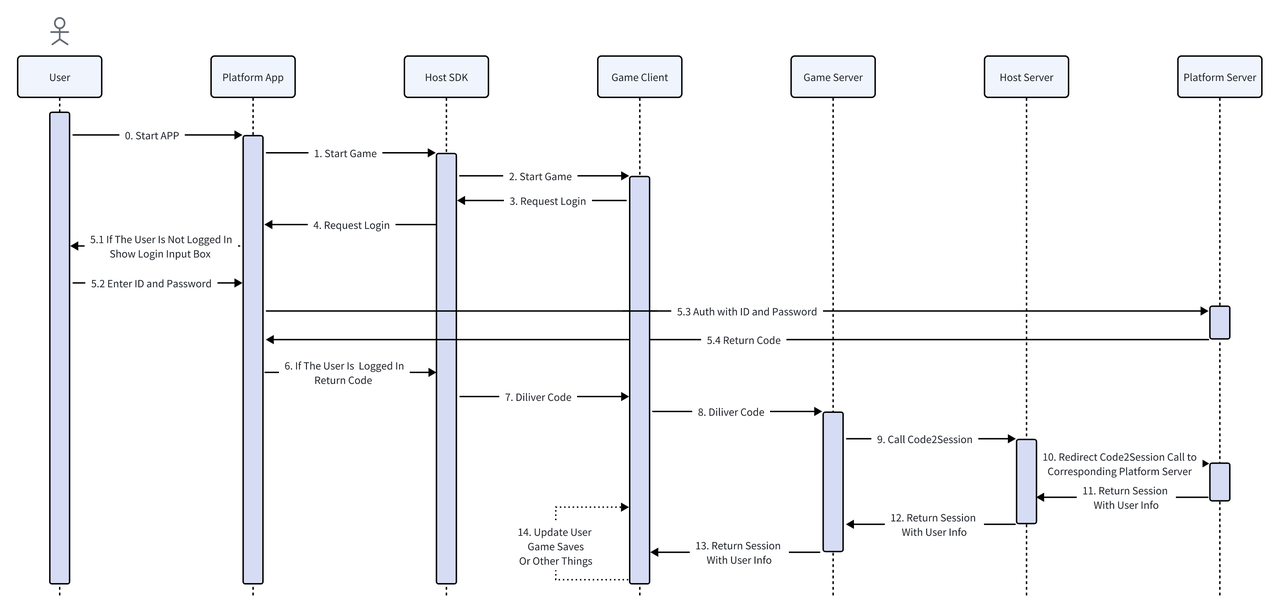
After the game client obtains the code by calling tj.login, platform app needs to obtain the user's login information through JS code2session to implement user login (Step 10 in the diagram above).
jscode2session
Here defines the implementation guidelines for the platform's APIs. If you are a game developer, please refer to
Minihost Platform Funtionality Documentation - Section 2.1.2 - jscode2sessionfor integration.
Provides the login capability of the platform. The host backend will pass the user's login credential (code) to the platform, which needs to return the user's login information based on this credential.
The host backend will map the uid returned by the platform to the openid and unionid available on the game side, based on the context of the request, and forward the session_key to the game side as a login credential.
Example of request:
GET /jscode2session?js_code={code} HTTP/1.1
Authorization: Bearer {service_token}
Request Parameter Description:
| parameter | Description |
|---|---|
| js_code | Platform Login Credentials |
| Authorization | Server token, formatted as Bearer {service_token} |
Response Example:
HTTP/1.1 200 OK
Content-Type: application/json

{
  "uid": "123456"
  "session_key": "abcdefg",
  "errcode": 0,
  "errmsg": "ok"
}
Response field description:
| Field | Description |
|---|---|
| uid | Unique user identifier returned by the platform |
| session_key | session_key returned by the platform |
| errcode | Error code, 0 indicates success |
| errmsg | Error Message |
1.3 Login Interface Integration Example
The access party's App can provide a custom JS file within the project to override the JS interface, and specify the path of the custom JS file when setting the game startup parameters.
Example of auth.js
// auth.js - Custom authentication implementation

// Override tj.login
tj.login = function(obj) {
  tj.customCommand('platformLogin', obj);
};

// Override tj.checkSession
tj.checkSession = function(obj) {
  tj.customCommand('checkSession', obj);
};

// Override tj.pluginLogin
tj.pluginLogin = function(obj) {
  tj.customCommand('pluginLogin', obj);
};
Inject the login JS file into the host
const { TJConstants } = require('webglhost-runtime-pc');
const path = require('path');

const options = {};
options[TJConstants.LAUNCH_KEY] = 'launch-key';
options[TJConstants.USER_ID] = 'user-123';

// Inject custom auth script
options[TJConstants.CUSTOM_SCRIPT_FILES] = [
  path.join(__dirname, 'custom-scripts', 'auth.js')
];

await gameHandle.setGameStartOptions(options);
Implement login logic in the host
// Setup custom command listeners for auth
gameHandle.setCustomCommandListener('platformLogin', (request, handle) => {
  // Call your platform's login SDK
  yourPlatformSDK.login()
    .then(result => {
      handle.success({
        code: result.authCode,
        userId: result.userId
      });
    })
    .catch(error => {
      handle.fail(20001, error.message);
    });
});

gameHandle.setCustomCommandListener('checkSession', (request, handle) => {
  // Check session validity
  yourPlatformSDK.checkSession()
    .then(() => {
      handle.success({});
    })
    .catch(error => {
      handle.fail(20002, 'Session expired');
    });
});

gameHandle.setCustomCommandListener('pluginLogin', (request, handle) => {
  // Handle plugin login
  yourPlatformSDK.pluginLogin()
    .then(result => {
      handle.success({
        code: result.authCode
      });
    })
    .catch(error => {
      handle.fail(20003, error.message);
    });
});
2 Advertising SDK
2.1 Advertising Component Interface List
The advertising JS interfaces provided by the Host SDK to minigame developers are as follows.
tj.createRewardedVideoAd()
The return value is RewardedVideoAd, and the exposed methods are:
| Function Name | Function Description | Return value |
|---|---|---|
| RewardedVideoAd.load() | Load rewarded video ad | Promise
|
| RewardedVideoAd.show() | Show incentive video ad | Promise
|
| RewardedVideoAd.destroy() | Destroy the rewarded video ad instance | |
| RewardedVideoAd.onLoad(function listener) | Listen for the incentive video ad loading event. Parameter: function listener
| |
| RewardedVideoAd.offLoad(function listener) | Listen for the incentive video ad loading event. Parameter: function listener
| |
| RewardedVideoAd.onError(function listener) | Listen for the error event of the incentive video. Parameter: function listener
| |
| RewardedVideoAd.offError(function listener) | Remove the listener function for the incentive video error event Parameter: function listener
| |
| RewardedVideoAd.onClose(function listener) | Listen for the event when the user clicks the close ad button. Parameter: function listener
| |
| RewardedVideoAd.offClose(function listener) | Remove the event listener function for the user click Close Ad button Parameter: function listener
|
Below, taking "Create Rewarded Video Ad" as an example, we will introduce how to override the ad interface and integrate ad logic.
2.2 Advertising Component Interface Example
tj.createRewardedVideoAd()
This interface is used to create a rewarded video ad component and returns RewardedVideoAd instance. Some of the methods exposed by the instance are:
-
RewardedVideoAd.load()loads a rewarded ad and returns a Promise -
RewardedVideoAd.onLoad(callback)accepts a function as a parameter to listen for the ad load event -
RewardedVideoAd.offLoad(callback)removes the listener function for the ad load event; if no parameters are passed, all listeners will be removed
The Host SDK does not have built-in advertising functionality, but only provides a default implementation of tj.createRewardedVideoAd() , and the methods exposed by the RewardedVideoAd instance returned by this implementation are all empty implementations. When a minigame developer calls RewardedVideoAd.load() , it cannot actually load a rewarded ad.
Therefore, the access party's App needs to override this tj.createRewardedVideoAd(), so that the RewardedVideoAd.load() calls the loading interface of the third-party advertising SDK integrated within the App, and similarly implements the other interfaces exposed by RewardedVideoAd to achieve the integration of advertising functionality.
2.3 Access Third-Party Advertising SDK
Taking the integrated incentive ad API as an example, you can refer to the following ad.js implementation:
ad.js Example
// ad.js - Custom ad implementation

let rewardedVideoAdOnLoadCallbacks = [];
let rewardedVideoAdOnErrorCallbacks = [];
let rewardedVideoAdOnCloseCallbacks = [];

tj.createRewardedVideoAd = (obj) => {
  const adUnitId = obj.adUnitId;

  return {
    onLoad: (callback) => {
      console.info("[Host] invoke RewardedVideoAd.onLoad");
      if (callback && typeof callback === "function") {
        if (!rewardedVideoAdOnLoadCallbacks.includes(callback)) {
          rewardedVideoAdOnLoadCallbacks.push(callback);
        }
      }
    },

    load: () => {
      console.info("[Host] invoke RewardedVideoAd.load");

      return new Promise((resolve, reject) => {
        tj.customCommand("loadRewardAd", {
          adUnitId: adUnitId,
          success: function (res) {
            console.info("[Host] RewardedVideoAd.load success");
            resolve(res);
          },
          fail: function (obj) {
            console.info("[Host] RewardedVideoAd.load fail");
            reject(obj);
          },
          complete: function () {
            console.info("[Host] RewardedVideoAd.load complete");
          },
        });
      });
    },

    show: () => {
      console.info("[Host] invoke RewardedVideoAd.show");

      return new Promise((resolve, reject) => {
        tj.customCommand("showRewardAd", {
          adUnitId: adUnitId,
          success: function (res) {
            console.info("[Host] RewardedVideoAd.show success");
            resolve(res);
          },
          fail: function (obj) {
            console.info("[Host] RewardedVideoAd.show fail");
            reject(obj);
          },
        });
      });
    },

    offLoad: (callback) => {
      console.info("[Host] invoke RewardedVideoAd.offLoad");
      if (callback === undefined) {
        rewardedVideoAdOnLoadCallbacks = [];
      } else if (callback && typeof callback === "function") {
        rewardedVideoAdOnLoadCallbacks = rewardedVideoAdOnLoadCallbacks.filter(
          (cb) => cb !== callback
        );
      }
    },

    onError: (callback) => {
      console.info("[Host] invoke RewardedVideoAd.onError");
      if (callback && typeof callback === "function") {
        if (!rewardedVideoAdOnErrorCallbacks.includes(callback)) {
          rewardedVideoAdOnErrorCallbacks.push(callback);
        }
      }
    },

    offError: (callback) => {
      console.info("[Host] invoke RewardedVideoAd.offError");
      if (callback === undefined) {
        rewardedVideoAdOnErrorCallbacks = [];
      } else if (callback && typeof callback === "function") {
        rewardedVideoAdOnErrorCallbacks = rewardedVideoAdOnErrorCallbacks.filter(
          (cb) => cb !== callback
        );
      }
    },

    onClose: (callback) => {
      console.info("[Host] invoke RewardedVideoAd.onClose");
      if (callback && typeof callback === "function") {
        if (!rewardedVideoAdOnCloseCallbacks.includes(callback)) {
          rewardedVideoAdOnCloseCallbacks.push(callback);
        }
      }
    },

    offClose: (callback) => {
      console.info("[Host] invoke RewardedVideoAd.offClose");
      if (callback === undefined) {
        rewardedVideoAdOnCloseCallbacks = [];
      } else if (callback && typeof callback === "function") {
        rewardedVideoAdOnCloseCallbacks = rewardedVideoAdOnCloseCallbacks.filter(
          (cb) => cb !== callback
        );
      }
    },

    destroy: () => {
      console.info("[Host] invoke RewardedVideoAd.destroy");
      rewardedVideoAdOnLoadCallbacks = [];
      rewardedVideoAdOnErrorCallbacks = [];
      rewardedVideoAdOnCloseCallbacks = [];
    }
  };
};

// Callback functions to be called from host
rewardedVideoLoadCallback = () => {
  try {
    rewardedVideoAdOnLoadCallbacks.forEach((callback) => callback());
  } catch (error) {
    console.error("[Host] Error in rewardedVideoLoadCallback:", error);
  }
};

rewardedVideoErrorCallback = (error) => {
  try {
    rewardedVideoAdOnErrorCallbacks.forEach((callback) => callback(error));
  } catch (error) {
    console.error("[Host] Error in rewardedVideoErrorCallback:", error);
  }
};

rewardedVideoCloseCallback = (result) => {
  try {
    rewardedVideoAdOnCloseCallbacks.forEach((callback) => callback(result));
  } catch (error) {
    console.error("[Host] Error in rewardedVideoCloseCallback:", error);
  }
};
Inject advertising JS files into the host
const { TJConstants } = require('webglhost-runtime-pc');
const path = require('path');

const options = {};
options[TJConstants.LAUNCH_KEY] = 'launch-key';
options[TJConstants.USER_ID] = 'user-123';

// Inject custom ad script
options[TJConstants.CUSTOM_SCRIPT_FILES] = [
  path.join(__dirname, 'custom-scripts', 'ad.js')
];

await gameHandle.setGameStartOptions(options);
Implement advertising logic in the host
// Setup custom command listeners for ads
gameHandle.setCustomCommandListener('loadRewardAd', (request, handle) => {
  const adUnitId = request.adUnitId;

  console.log('Loading reward ad:', adUnitId);

  // Call your ad SDK to load the ad
  yourAdSDK.loadRewardedVideo(adUnitId)
    .then(() => {
      handle.success({});

      // Notify JS that ad loaded successfully
      gameHandle.runCustomScript(`
        rewardedVideoLoadCallback();
      `, (result, error) => {
        if (error) {
          console.error('Error calling load callback:', error);
        }
      });
    })
    .catch(error => {
      handle.fail(30001, error.message);

      // Notify JS that ad load failed
      gameHandle.runCustomScript(`
        rewardedVideoErrorCallback({ errCode: 30001, errMsg: '${error.message}' });
      `, (result, error) => {
        if (error) {
          console.error('Error calling error callback:', error);
        }
      });
    });
});

gameHandle.setCustomCommandListener('showRewardAd', (request, handle) => {
  const adUnitId = request.adUnitId;

  console.log('Showing reward ad:', adUnitId);

  // Call your ad SDK to show the ad
  yourAdSDK.showRewardedVideo(adUnitId)
    .then(result => {
      handle.success({});

      // Notify JS when ad is closed
      const isAdWatched = result.isAdWatched; // User watched ad completely
      gameHandle.runCustomScript(`
        rewardedVideoCloseCallback({ isEnded: ${isAdWatched} });
      `, (result, error) => {
        if (error) {
          console.error('Error calling close callback:', error);
        }
      });
    })
    .catch(error => {
      handle.fail(30002, error.message);
    });
});
2.4 Complete Ad Integration Example
const { TJHostHandle, TJConstants } = require('webglhost-runtime-pc');
const path = require('path');

class AdManager {
  constructor(gameHandle) {
    this.gameHandle = gameHandle;
    this.setupAdListeners();
  }

  setupAdListeners() {
    // Load ad listener
    this.gameHandle.setCustomCommandListener('loadRewardAd', (request, handle) => {
      this.handleLoadRewardAd(request, handle);
    });

    // Show ad listener
    this.gameHandle.setCustomCommandListener('showRewardAd', (request, handle) => {
      this.handleShowRewardAd(request, handle);
    });
  }

  async handleLoadRewardAd(request, handle) {
    const adUnitId = request.adUnitId;

    try {
      console.log(`Loading rewarded video ad: ${adUnitId}`);

      // Simulate ad loading (replace with actual ad SDK call)
      await this.simulateAdLoad(adUnitId);

      // Success callback to host
      handle.success({});

      // Notify JS layer that ad loaded
      this.notifyAdLoaded();

    } catch (error) {
      handle.fail(30001, error.message);
      this.notifyAdError(error);
    }
  }

  async handleShowRewardAd(request, handle) {
    const adUnitId = request.adUnitId;

    try {
      console.log(`Showing rewarded video ad: ${adUnitId}`);

      // Simulate ad showing (replace with actual ad SDK call)
      const result = await this.simulateAdShow(adUnitId);

      // Success callback to host
      handle.success({});

      // Notify JS layer that ad closed
      this.notifyAdClosed(result.isEnded);

    } catch (error) {
      handle.fail(30002, error.message);
      this.notifyAdError(error);
    }
  }

  notifyAdLoaded() {
    this.gameHandle.runCustomScript(`
      if (typeof rewardedVideoLoadCallback === 'function') {
        rewardedVideoLoadCallback();
      }
    `, (result, error) => {
      if (error) {
        console.error('Error notifying ad loaded:', error);
      }
    });
  }

  notifyAdError(error) {
    this.gameHandle.runCustomScript(`
      if (typeof rewardedVideoErrorCallback === 'function') {
        rewardedVideoErrorCallback({
          errCode: ${error.code || 30000},
          errMsg: '${error.message}'
        });
      }
    `, (result, err) => {
      if (err) {
        console.error('Error notifying ad error:', err);
      }
    });
  }

  notifyAdClosed(isEnded) {
    this.gameHandle.runCustomScript(`
      if (typeof rewardedVideoCloseCallback === 'function') {
        rewardedVideoCloseCallback({ isEnded: ${isEnded} });
      }
    `, (result, error) => {
      if (error) {
        console.error('Error notifying ad closed:', error);
      }
    });
  }

  // Simulate ad loading (replace with actual ad SDK integration)
  async simulateAdLoad(adUnitId) {
    return new Promise((resolve, reject) => {
      setTimeout(() => {
        console.log(`Ad ${adUnitId} loaded successfully`);
        resolve();
      }, 1000);
    });
  }

  // Simulate ad showing (replace with actual ad SDK integration)
  async simulateAdShow(adUnitId) {
    return new Promise((resolve, reject) => {
      setTimeout(() => {
        console.log(`Ad ${adUnitId} shown successfully`);
        // Simulate user watching ad completely
        resolve({ isEnded: true });
      }, 2000);
    });
  }
}

// Usage
async function initializeWithAds() {
  const hostHandle = await new Promise((resolve, reject) => {
    TJHostHandle.initialize('sdk-key', 'sdk-secret', (handle, error) => {
      if (error) reject(error);
      else resolve(handle);
    });
  });

  const gameHandle = await hostHandle.createGameHandle();

  // Initialize ad manager
  const adManager = new AdManager(gameHandle);

  // Setup game options with custom ad script
  const options = {
    [TJConstants.LAUNCH_KEY]: 'launch-key',
    [TJConstants.USER_ID]: 'user-123',
    [TJConstants.CUSTOM_SCRIPT_FILES]: [
      path.join(__dirname, 'custom-scripts', 'ad.js')
    ]
  };

  await gameHandle.setGameStartOptions(options);
  await gameHandle.start();
  await gameHandle.play();
}

initializeWithAds().catch(console.error);
3 Payment SDK
3.1 Flowchart
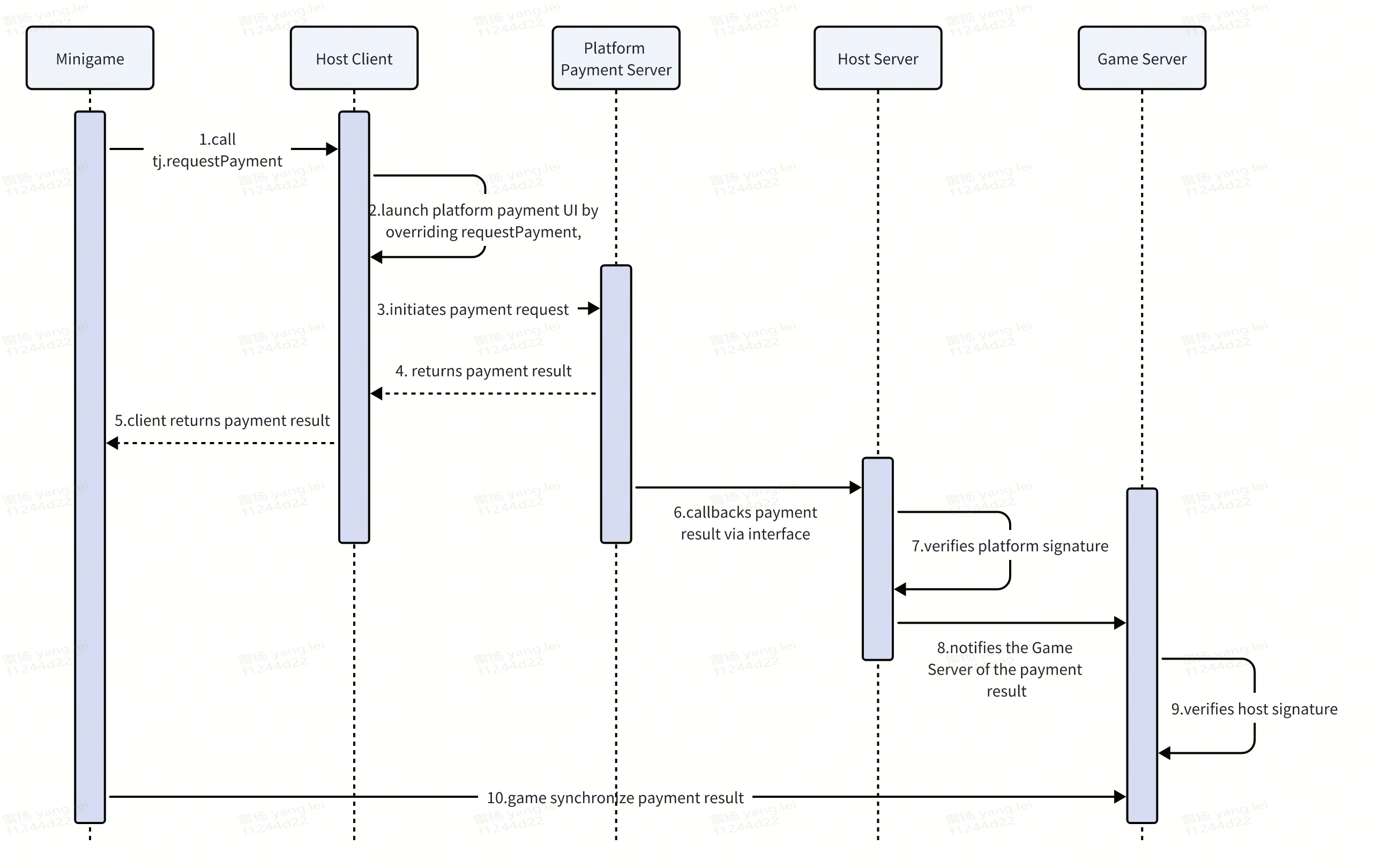
3.1.1 Minigame Payment
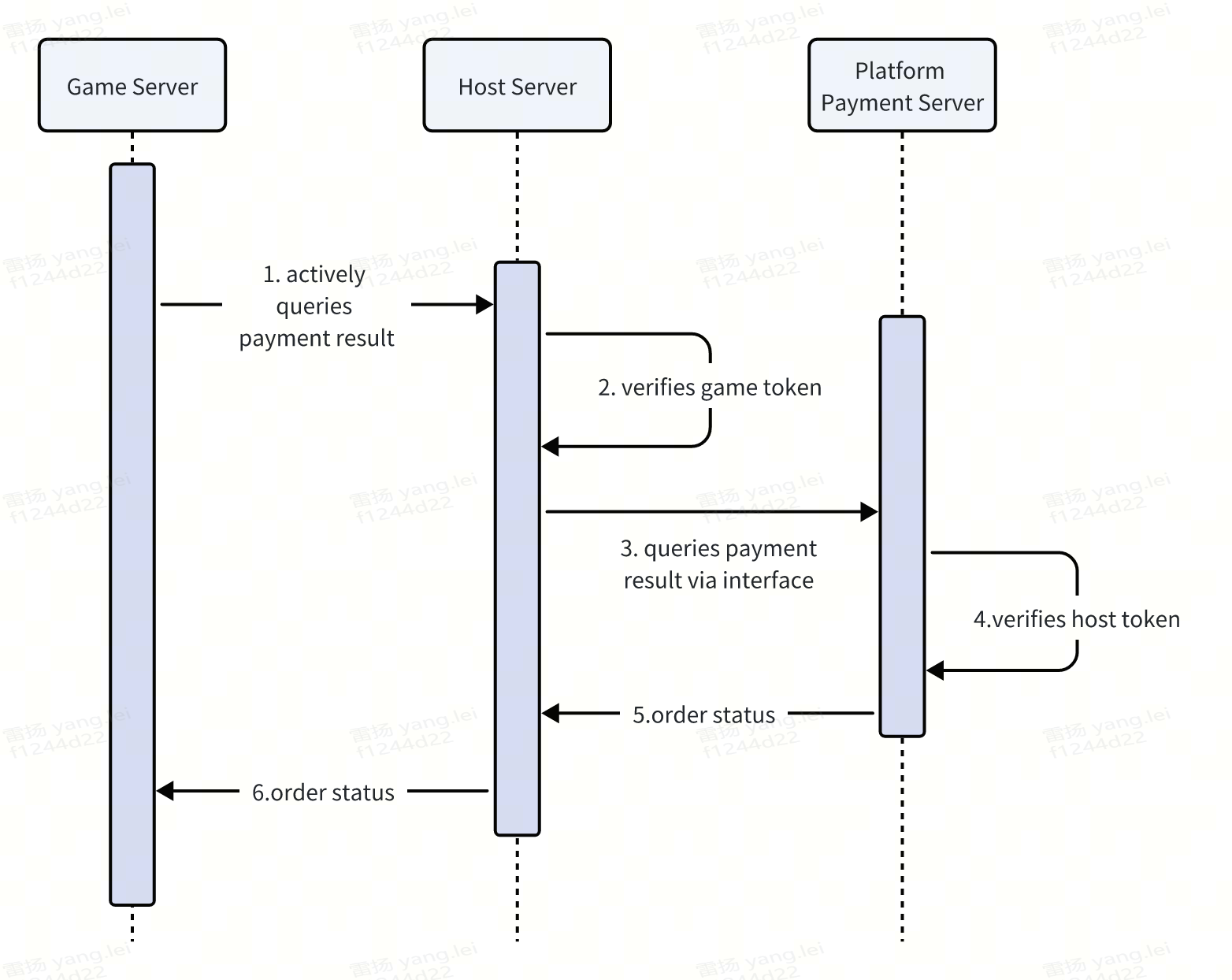
3.1.2 Game Servers Actively Query Order
3.2 Client Interface
tj.requestPayment(Object obj)
Parameter Description
| Attribute Name | Type | Default Value | Required | Description |
|---|---|---|---|---|
| mode | string | game | Yes | Payment type, enumeration value
|
| env | number | 0 | Yes | Environment Configuration, Enumerated Value
|
| currencyType | string | CNY | Yes | Currency, enumeration value
|
| platform | string | Yes | Platform at the time of application for access, android or ios | |
| buyQuantity | number | No | Quantity Purchased | |
| zoneId | string | 1 | No | Game service area ID, customized by the developer. If the game does not have different regions, default to "1". |
| customId | string | Yes | A unique order number customized by the game developer, which will be postbacked via server payment result callback after the order payment is successful. It must be unique; otherwise, an error will occur if it is not passed or the same value is passed repeatedly. | |
| extraInfo | string | No | Other information customized by game developers will be postbacked viaserver payment result callbackafter the order payment is successful. The maximum length of the string cannot exceed 256. | |
| goodType | number | 2 | No | Payment scenario, enumeration value
|
| orderAmount | number | Yes | represents the cash price of the item, with the unit being [Chinese Yuan cents] | |
| goodName | string | Yes | When goodType is for the direct purchase scenario of items, it represents the item name, with a length limit of less than or equal to 10 characters, used to distinguish item types | |
| options | map | No | Extended Parameters, can be customized based on platform requirements | |
| success | function | No | Callback function for successful interface call | |
| fail | function | No | Callback function for interface call failure | |
| complete | function | No | Callback function for the end of interface call (executed upon both successful and failed calls) |
3.2.1 Callback Success Parameters
Object type, with the following properties
| Attribute Name | Type | Description |
|---|---|---|
| errMsg | string | requestPayment:ok |
3.2.2 Callback Failure Parameters
Object type, with the following properties
| Attribute Name | Type | Description |
|---|---|---|
| errMsg | string | "requestPayment:fail " + Error Details |
| errCode | number | Error code, for corresponding information, please refer to the error code description |
3.2.3 Callback End Parameters
Object type, with the following properties
| Attribute Name | Type | Description |
|---|---|---|
| errMsg | string | requestPayment:ok |
3.2.4 Error Code Description
Map according to actual support situation
| errCode | errMsg | Description |
|---|---|---|
| -1 | requestPayment:fail Payment failed | User payment failed |
| -1 | requestPayment:fail internal error | Internal error in the minigame framework |
| -2 | requestPayment:fail Payment cancelled | User cancelled payment |
| 3 | requestPayment:fail error_tip_start_cash_register_fail | Failed to launch the cashier desk, such as encountering an internal error in the minigame framework |
| 4 | requestPayment:fail Network error | User network is abnormal |
| -15002 | requestPayment:fail The request parameters are invalid | Request parameters are invalid |
| -15006 | requestPayment:fail The app does not have payment permissions | Please confirm whether to set the game coin exchange rate |
| -15098 | requestPayment:fail The current user has not passed real-name authentication | The current user has not passed real-name authentication |
| -15099 | requestPayment:fail The current user's cumulative payment amount exceeds the limit | The cumulative payment amount of the current user exceeds the limit |
| -15101 | requestPayment:fail customId is empty or not unique | customId is empty or not unique |
| -16000 | requestPayment:fail User not logged in | User is not logged in |
| -20002 | requestPayment:fail Transaction is at risk | The transaction is risky and has been intercepted by the risk control strategy |
| 21113 | requestPayment:fail face authentication failed | A suspected minor order was detected, face verification was initiated, and the face verification failed |
3.2.5 Example Code
tj.requestPayment({
    mode: 'game',
    env: 0,
    currencyType: 'CNY',
    platform: 'ios',
    zoneId: '1',
    customId: 'order_' + Date.now(),
    extraInfo: JSON.stringify({
      orderId: 'test_order_' + Date.now(),
      userId: '10001'
    }),
    goodType: 2,
    orderAmount: 100,
    goodName: 'Remove Ads',
    options: {
        'PRODUCT_CODE': '1001'
    },
    success: function success(res) {
      console.log('[Game JS Side] Payment successful:', res);
      tj.showToast({
        title: 'Payment successful, play again!',
        duration: 2000
      });
    },
    fail: function fail(err) {
      if (err.errCode && err.errCode == -2) {
        console.log('[Game JS Side] User canceled payment');
        tj.showToast({
          title: 'Payment canceled, please try again!',
          duration: 2000
        });
      } else {
        console.error('[Game JS Side] Payment failed:', err);
        tj.showToast({
          title: 'Payment failed, please retry!',
          duration: 2000
        });
      }
    },
    complete: function complete(res) {
      console.log('[Game JS Side] Payment process completed:', res);
    }
})
3.3 Server Interface
3.3.1 Server Callback Interface
After the payment is successful, the platform server sends a payment success callback to the host server. After verifying the signature, the host server sends the callback to the game server.
3.3.1.1 Callback Address
POST https://minihost.tuanjie.cn/game-api/v1/payment/callback
3.3.1.2 Request Parameters
| Parameter Name | Type | Description |
|---|---|---|
| timestamp | string | Timestamp |
| nonce | string | Random Number |
| msg | string | Payment result information of Json string type, see 2.1.3 PaymentInfo object |
| signature | string | Signature, see Section 2.1.4 Signature for the signature algorithm |
3.3.1.3 PaymentInfo
| Parameter Name | Type | Description |
|---|---|---|
| appid | string | Platform-side minigame appid |
| cp_orderno | string | Developer-defined order number, the customId parameter in the tj.requestPayment method |
| cp_extra | string | Extra parameters passed by the developer, the extra parameter in the tj.requestPayment method |
| order_no_channel | string | Minigame Backend Transaction Order Number |
| amount_cent | int64 | Order amount, in RMB cents |
| amount_coin | int64 | The quantity of game coins purchased is not involved in the platform's integration process and can be ignored. |
| currency | string | Payment currency, CNY Renminbi, DIAMOND Diamond |
3.3.1.4 Signature
Generate a signature using the SHA1 algorithm based on token, timestamp, nonce, and msg, and compare it with the signature returned by the platform's server.
Precondition: When associating a game, the platform party needs to pass token to the host for signature verification
Sample Golang code:
sortedString := make([]string, 4)
sortedString = append(sortedString, token)
sortedString = append(sortedString, timestamp)
sortedString = append(sortedString, nonce)
sortedString = append(sortedString, string(msg))
sort.Strings(sortedString)h := sha1.New()
h.Write([]byte(strings.Join(sortedString, "")))_signature := h.Sum(nil)
3.3.1.5 Response
The host server returns a 200 status code as a successful response. If the returned HTTP status code is not 200, it indicates that the notification has failed and a retry is required.
3.3.2 Game Server Actively Query Order Interface
Server-side payment callbacks may fail to reach 100% due to reasons such as network anomalies. Developers can use this interface to actively check the order status to prevent over-delivery or under-delivery. Developers send a query order request to the host server, which then encapsulates and sends the query order request to the platform server.
3.3.2.1 Interface Address
Provided by the platform
3.3.2.2 Request Parameters
| Parameter Name | Type | Description |
|---|---|---|
| token | string | The two parties agree on the server token |
| orderno | string | cp Custom Order Number, passed in when placing an order, the customId parameter in the tj.requestPayment method |
3.3.2.3 Response
| Parameter Name | Type | Description |
|---|---|---|
| status | string | Payment status. "success" indicates successful payment and coin arrival, "unsuccess" indicates payment failure |
3.3.2.4 Authentication
The request must include the server token agreed upon by both parties, placed in the Authorization header, with a format like
Bearer {service_token}
sortedString := make([]string, 4)
sortedString = append(sortedString, token)
sortedString = append(sortedString, timestamp)
sortedString = append(sortedString, nonce)
sortedString = append(sortedString, string(msg))
sort.Strings(sortedString)h := sha1.New()
h.Write([]byte(strings.Join(sortedString, "")))_signature := h.Sum(nil)
3.2.1.5 Response
The host server returns a 200 status code as a successful response. If the returned HTTP status code is not 200, it indicates that the notification has failed and a retry is required.
3.2.2 Active Query Order Interface
Server-side payment callbacks may fail to reach 100% due to reasons such as network anomalies. Developers can use this interface to actively check the order status to prevent over-delivery or under-delivery. Developers send a query order request to the host server, which then encapsulates and sends the query order request to the platform server.
3.2.2.1 Interface Address
Provided by the platform
3.2.2.2 Request Parameters
| Parameter Name | Type | Description |
|---|---|---|
| token | string | The two parties agree on the server token |
| orderno | string | cp Custom Order Number, passed in when placing an order, the customId parameter in the tj.requestPayment method |
3.2.2.3 Response
| Parameter Name | Type | Description |
|---|---|---|
| status | string | Payment status. "success" indicates successful payment and coin arrival, "unsuccess" indicates payment failure |
3.2.2.4 Authentication
The request must include the server token agreed upon by both parties, placed in the Authorization header, with a format like
Bearer {service_token}
3.4 Payment Interface Integration Example
payment.js Example
// payment.js - Custom payment implementation

// Override tj.requestPayment
tj.requestPayment = function(obj) {
  tj.customCommand('platformPayment', obj);
};

// Override tj.requestVirtualPayment
tj.requestVirtualPayment = function(obj) {
  tj.customCommand('virtualPayment', obj);
};
Implement payment logic in the host
const { TJConstants } = require('webglhost-runtime-pc');
const path = require('path');

// Setup payment options
const options = {};
options[TJConstants.LAUNCH_KEY] = 'launch-key';
options[TJConstants.USER_ID] = 'user-123';
options[TJConstants.CUSTOM_SCRIPT_FILES] = [
  path.join(__dirname, 'custom-scripts', 'payment.js')
];

await gameHandle.setGameStartOptions(options);

// Setup payment listeners
gameHandle.setCustomCommandListener('platformPayment', (request, handle) => {
  // Call your payment SDK
  yourPaymentSDK.requestPayment({
    orderId: request.orderId,
    amount: request.amount,
    description: request.description
  })
    .then(result => {
      handle.success({
        transactionId: result.transactionId,
        status: 'success'
      });
    })
    .catch(error => {
      handle.fail(40001, error.message);
    });
});

gameHandle.setCustomCommandListener('virtualPayment', (request, handle) => {
  // Handle virtual payment
  yourPaymentSDK.requestVirtualPayment(request)
    .then(result => {
      handle.success(result);
    })
    .catch(error => {
      handle.fail(40002, error.message);
    });
});
4 Complete Platform Integration Example
const { TJHostHandle, TJConstants } = require('webglhost-runtime-pc');
const path = require('path');

class PlatformIntegrationManager {
  constructor(gameHandle) {
    this.gameHandle = gameHandle;
    this.setupAllListeners();
  }

  setupAllListeners() {
    this.setupAuthListeners();
    this.setupAdListeners();
    this.setupPaymentListeners();
  }

  // Authentication
  setupAuthListeners() {
    this.gameHandle.setCustomCommandListener('platformLogin', (request, handle) => {
      this.handleLogin(request, handle);
    });

    this.gameHandle.setCustomCommandListener('checkSession', (request, handle) => {
      this.handleCheckSession(request, handle);
    });
  }

  async handleLogin(request, handle) {
    try {
      const result = await yourPlatformSDK.login();
      handle.success({
        code: result.authCode,
        userId: result.userId
      });
    } catch (error) {
      handle.fail(20001, error.message);
    }
  }

  async handleCheckSession(request, handle) {
    try {
      await yourPlatformSDK.checkSession();
      handle.success({});
    } catch (error) {
      handle.fail(20002, 'Session expired');
    }
  }

  // Ads
  setupAdListeners() {
    this.gameHandle.setCustomCommandListener('loadRewardAd', (request, handle) => {
      this.handleLoadAd(request, handle);
    });

    this.gameHandle.setCustomCommandListener('showRewardAd', (request, handle) => {
      this.handleShowAd(request, handle);
    });
  }

  async handleLoadAd(request, handle) {
    try {
      await yourAdSDK.loadAd(request.adUnitId);
      handle.success({});
      this.notifyAdLoaded();
    } catch (error) {
      handle.fail(30001, error.message);
    }
  }

  async handleShowAd(request, handle) {
    try {
      const result = await yourAdSDK.showAd(request.adUnitId);
      handle.success({});
      this.notifyAdClosed(result.isEnded);
    } catch (error) {
      handle.fail(30002, error.message);
    }
  }

  notifyAdLoaded() {
    this.gameHandle.runCustomScript('rewardedVideoLoadCallback();', () => {});
  }

  notifyAdClosed(isEnded) {
    this.gameHandle.runCustomScript(
      `rewardedVideoCloseCallback({ isEnded: ${isEnded} });`,
      () => {}
    );
  }

  // Payment
  setupPaymentListeners() {
    this.gameHandle.setCustomCommandListener('platformPayment', (request, handle) => {
      this.handlePayment(request, handle);
    });
  }

  async handlePayment(request, handle) {
    try {
      const result = await yourPaymentSDK.requestPayment(request);
      handle.success(result);
    } catch (error) {
      handle.fail(40001, error.message);
    }
  }
}

// Initialize with all platform integrations
async function initializeWithPlatformIntegration() {
  const hostHandle = await new Promise((resolve, reject) => {
    TJHostHandle.initialize('sdk-key', 'sdk-secret', (handle, error) => {
      if (error) reject(error);
      else resolve(handle);
    });
  });

  const gameHandle = await hostHandle.createGameHandle();

  // Initialize platform integration manager
  const platformManager = new PlatformIntegrationManager(gameHandle);

  // Setup game options with all custom scripts
  const options = {
    [TJConstants.LAUNCH_KEY]: 'launch-key',
    [TJConstants.USER_ID]: 'user-123',
    [TJConstants.CUSTOM_SCRIPT_FILES]: [
      path.join(__dirname, 'custom-scripts', 'auth.js'),
      path.join(__dirname, 'custom-scripts', 'ad.js'),
      path.join(__dirname, 'custom-scripts', 'payment.js')
    ]
  };

  await gameHandle.setGameStartOptions(options);
  await gameHandle.start();
  await gameHandle.play();

  return { hostHandle, gameHandle, platformManager };
}

// Usage
initializeWithPlatformIntegration()
  .then(({ gameHandle }) => {
    console.log('Platform integration initialized successfully');
  })
  .catch(error => {
    console.error('Platform integration failed:', error);
  });