Server Intergration
1 SDK Integration
Please refer to [Android/iOS/PC] Host Runtime SDK Documentation - Quick Start
2 Platform Server Integration
2.1 Channel API
For third-party game platforms, Minihost provides Channel API access capabilities to centrally manage game content and game packages hosted on Minihost.
2.1.1 Access Instructions
Before performing API integration, the platform party needs to obtain the corresponding Channel AccessToken as the secret access key for API access.
If the Channel AccessToken is leaked, please contact us immediately for reset.
The API usage rules for the production environment are as follows:
METHOD PATH HTTP/1.1
Host: minihost.tuanjie.cn
Authorization: Bearer <Channel AccessToken>
Both the request body and response body are in JSON format by default.
When the returned status code is greater than 400, it is considered an interface error, and error handling should be performed through the following response body:
{
  "errorCode": "example error", // Used for error type inference
  "message": "example message", // Error message (English)
  "target": "example" // Field/Object name in error
}
2.1.1.1 Game Management
After developers choose to submit games to the corresponding platform on Minihost, the platform can use the following APIs to provide corresponding game management capabilities on its own platform.
Backend side:
-
Get Game List Get a list of all games related to the platform party.
-
Edit Game Information After the game is launched on the platform, developers can no longer update game information on the Minihost interface. The platform should call this API at an appropriate time (e.g., after content moderation is approved) to ensure that the Minihost can display correct game information and perform calls that require platform participation, such as payments, during actual operation.
-
Take Down Games This API can be called when the platform terminates the contract with the developer and needs to unlink the game.
Developer side:
- Publish Games When a game developer performs the operation of going live with a game package on the platform, the platform needs to call this API to inform Minihost of the game package ID required for the online version of the game.
2.1.1.1.1 Channel Associate Games
When the channel party associates a game, it requires the developer to provide the associateKey for game association
- The channel party retrieves game information based on the associateKey
GET /api/channel/v1/game_app/associate/:associateKey/info
| Parameter Type | Value Type | Required | Instructions | |
|---|---|---|---|---|
| associateKey | path | string | Yes | Temporary key generated during game association |
Response Body Description
{
  "id": "string", // gameId
  "launchKey": "string", // launchKey
  "orgId": "string", // game's organization
  "name": "string", // game name
  "briefIntro": "string", // game breif introduction
  "iconUrl": "string", // game icon
  "tags": [ // tags
    "string"
  ],
  "createdTime": "createdTime",
  "updatedTime": "updatedTime",
}
- Notify the association after the channel is successfully associated with the game
POST /api/channel/v1/game_app/associate/:associateKey/success
Input Parameter Description
| Parameter Type | Value Type | Required | Instructions | |
|---|---|---|---|---|
| associateKey | path | string | Yes | Temporary key generated during game association |
Request Body Description
{
  "gameId": "string",
  "channelGameId": "string",
}
Response Body Description
{
  "id": "string", // gameId
  "launchKey": "string", // launchKey
  "orgId": "string", // game's organization
  "name": "string", // game name
  "briefIntro": "string", // game breif introduction
  "iconUrl": "string", // game icon
  "tags": [ // tags
    "string"
  ],
  "createdTime": "createdTime",
  "updatedTime": "updatedTime",
}
2.1.1.1.2 Get Game List
GET /api/channel/v1/game_app_list
Input Parameter Description
| Parameter Type | Value Type | Required | Instructions | |
|---|---|---|---|---|
| page | query | int | No | Page number, starting and default value is 1 |
| pageSize | query | int | No | Page size, default value is 100 |
| orderBy | query | string | No | Sorting, you can choose createdTime or updatedTime for sorting |
| order | query | string | No | Order, asc or desc |
Response Body Description
{
  "items": [
    {
      "id": "string", // gameId
      "launchKey": "string", // launchKey
      "orgId": "string", // game's organization
      "name": "string", // game name
      "briefIntro": "string", // game breif introduction
      "iconUrl": "string", // game icon
      "latestBundleId": "string", // published game package
      "tags": [ // tags
        "string"
      ],
      "createdTime": "createdTime",
      "updatedTime": "updatedTime",
    }
  ],
  "total": 0
}
2.1.1.1.3 Get Game Information
GET /api/channel/v1/game_app/:id/info
Input Parameter Description
| Parameter Type | Value Type | Required | Instructions | |
|---|---|---|---|---|
| id | path | string | Yes | ID corresponding to the game to be accessed |
Response Body Description
{
  "id": "string", // gameId
  "launchKey": "string", // launchKey
  "orgId": "string", // game's organization
  "name": "string", // game name
  "briefIntro": "string", // game breif introduction
  "iconUrl": "string", // game icon
  "latestBundleId": "string", // published game package
  "tags": [ // tags
    "string"
  ],
  "createdTime": "createdTime",
  "updatedTime": "updatedTime",
}
2.1.1.1.4 Edit Game Information
PUT /api/channel/v1/game_app/:id/info
Input Parameter Description
| Parameter Type | Value Type | Required | Instructions | |
|---|---|---|---|---|
| id | path | string | Yes | ID corresponding to the game to be accessed |
Request Body Description
{
  "name": "game name",
  "iconUrl": "https://example.cdn.com/example.png", // publicly accessible icon URL
  "briefIntro": "game brief introduction",
}
Provide the fields that need to be updated for the update (e.g., if you do not intend to update the name field, then this field should not exist in the JSON).
Response Body Description
{
  "id": "string", // gameId
  "launchKey": "string", // launchKey
  "orgId": "string", // game's organization
  "name": "string", // game name
  "briefIntro": "string", // game breif introduction
  "iconUrl": "string", // game icon
  "latestBundleId": "string", // published game package
  "tags": [ // tags
    "string"
  ],
  "createdTime": "createdTime",
  "updatedTime": "updatedTime",
}
2.1.1.1.5 Publish Games
POST /api/channel/v1/game_app/:id/publish
Input Parameter Description
| Parameter Type | Value Type | Required | Instructions | |
|---|---|---|---|---|
| id | path | string | Yes | ID corresponding to the game to be accessed |
Request Body Description
{
  "bundleId": "example_id"
}
Response Body Description
{
  "id": "string", // gameId
  "launchKey": "string", // launchKey
  "orgId": "string", // game's organization
  "name": "string", // game name
  "briefIntro": "string", // game breif introduction
  "iconUrl": "string", // game icon
  "latestBundleId": "string", // published game package
  "tags": [ // tags
    "string"
  ],
  "createdTime": "createdTime",
  "updatedTime": "updatedTime",
}
2.1.1.1.6 Take down Games
DELETE /api/channel/v1/game_app/:id
Input Parameter Description
| Parameter Type | Value Type | Required | Instructions | |
|---|---|---|---|---|
| id | path | string | Yes | ID corresponding to the game to be accessed |
Response Body Description
After successful delisting, "OK" will be returned
2.1.1.2 Game Package Management
After developers choose to submit the game package to the platform in Minihost (they need to associate the game with the platform Channel first), the platform can use the following APIs to provide corresponding game package management capabilities on its own platform.
Backend side:
-
Get Game Package ListThis API can be used to view all submitted game packages, and the review list can be implemented by filtering the review status.
-
Obtain Temporary Session for Game Package provides the function of reviewing and trial-playing games. The access link of the temporary session can be made into a QR code, which can be scanned using the platform's APP for review and trial play.
-
Update Game Package Review Information records the final review results of the game package and supports revocation.
Developer side:
- Get Game Package List This API carries the gameId parameter, allowing developers to view the review status of game packages for the corresponding game on the platform and use Publish Games to launch versions that have passed review.
2.1.1.2.1 Get Game Package List
GET /api/channel/v1/game_bundle_list
Input Parameter Description
| Parameter Type | Value Type | Required | Instructions | |
|---|---|---|---|---|
| page | query | int | No | Page number, starting and default value is 1 |
| pageSize | query | int | No | Page size, default value is 100 |
| gameId | query | string | No | ID of the game to which the game package belongs |
| auditStatus | query | string | No | Game Package Review Status |
| publishStatus | query | string | No | Game package online status |
| orderBy | query | string | No | Sorting, you can choose createdTime or updatedTime for sorting |
| order | query | string | No | Order, asc or desc |
Explanation of Game Package Review Status
| Status | Instructions |
|---|---|
| pending | Initial state after successful game package upload |
| reviewing | Status after the game package starts review |
| accepted | Status after the game package passes the review |
| denied | Status after the game package fails the review |
| cancelled | Status after the game package is cancelled for review |
Game package online status
| Status | Instructions |
|---|---|
| online | Status of the game package after going live |
| offline | Historical released versions of the game package |
Response Body Description
{
  "items": [
    {
      "id": "string",  // bundleId
      "gameId": "string", // gameId
      "auditStatus": "pending", // game package audit status
      "publishStatus": "online", // game package release status
      "description": "string", // description
      "version": "string", // version
      "createdTime": "createdTime",
      "updatedTime": "updatedTime",
    }
  ],
  "total": 0
}
2.1.1.2.2 Obtain Temporary Session for Game Package
POST /api/channel/v1/game_bundle/:id/temp_session
Input Parameter Description
| Parameter Type | Value Type | Required | Instructions | |
|---|---|---|---|---|
| id | path | string | Yes | ID corresponding to the game package to be accessed |
Response Body Description
{
  "url": "https://minihost.tuanjie.cn/api/game_app/example_id/temp_session/example_session_id/start", // 临时会话的访问 URL,制成二维码后可以使用宿主扫码
  "expiresIn": 180 // temporary session expires in (seconds)
}
2.1.1.2.3 Update game package review information
PUT /api/channel/v1/game_bundle/:id/audit_info
Input Parameter Description
| Parameter Type | Value Type | Required | Instructions | |
|---|---|---|---|---|
| id | path | string | Yes | ID corresponding to the game package to be accessed |
Request Body Description
{
  "auditStatus": "accepted" // one of reviewing/accepted/denied/cancelled
}
Response Body Description
{
  "id": "string",  // bundleId
  "gameId": "string", // gameId
  "auditStatus": "pending", // game package audit status
  "publishStatus": "online", // game package release status
  "description": "string", // description
  "version": "string", // version
  "createdTime": "createdTime",
  "updatedTime": "updatedTime",
}
2.1.1.3 Game Package Upload and Push
After the developer associates the game with the channel provider, once the game package is successfully uploaded, it will be automatically pushed to the channel provider, and the channel provider needs to provide an interface to receive the push.
Request Body Description
{
  "id": "string",  // bundleId
  "gameId": "string", // gameId
  "auditStatus": "pending", // game package audit status
  "publishStatus": "online", // game package release status
  "description": "string", // description
  "version": "string", // version
  "createdTime": "createdTime",
  "updatedTime": "updatedTime",
}
Response Body Description
{
  "code": 200,
  "message": "success"
}
2.2 Server Token Integration Specification
2.2.1 Using Token to Retrieve Mini Game List
Platform parties can use server tokens to retrieve the list of mini games from the host application.
Request Example:
GET /api/game/list?appId={appId} HTTP/1.1
Host: minihost.tuanjie.cn
Authorization: Bearer {service_token}
Request Parameter Description:
| Parameter | Description |
|---|---|
| appId | Host Application ID |
| Authorization | Server token in the format Bearer {service_token} |
Response Example:
HTTP/1.1 200 OK
Content-Type: application/json
[
  {
    "id": "67b*********************",
    "appId": "67b*********************",
    "name": "Game Name",
    "briefIntro": "Brief Introduction",
    "gameType": "weixinminigame",
    "iconUrl": "https://minihost.cdn.tuanjie.cn/game_app/67b6eb506ffcda2559ecd19d/app_icon/********.png",
    "launchKey": "67b*********************",
  }
]
Response Field Description:
| Field | Description |
|---|---|
| id | Game ID |
| appId | Host Application ID |
| name | Game Name |
| briefIntro | Game Brief Intro |
| gameType | Game Type |
| iconUrl | Game Icon URL |
| launchKey | Value returned is Game ID |
| For usage of launchKey, please refer to Game Launch Parameters |
2.2.2 Server API Access Specification
This access specification is the implementation specification for platform party APIs. If you are a game-side developer, please refer to Mini Game API for integration.
2.2.2.1 ping
Used to test network connectivity between the host backend and the platform party. Only after successful connectivity verification can the URL be configured in the host backend. Request Example:
GET /ping HTTP/1.1
Response Example:
HTTP/1.1 200 OK
Content-Type: text/plain
pong
2.2.2.2 jscode2session
Provides the login capability of the platform party. The host backend will pass the user's login credential (code) to the platform party, which needs to return the user's login information based on this credential.
The host backend will map the uid returned by the platform party to openid and unionid available on the game side based on the request context, and forward the session_key to the game side as a login credential.
Request Example:
GET /jscode2session?js_code={code} HTTP/1.1
Authorization: Bearer {service_token}
Request Parameter Description:
| Parameter | Description |
|---|---|
| js_code | Platform party login credential |
| Authorization | Server token in the format Bearer {service_token} |
| Response Example: |
HTTP/1.1 200 OK
Content-Type: application/json
{
  "uid": "123456"
  "session_key": "abcdefg",
  "errcode": 0,
  "errmsg": "ok"
}
Response Field Description:
| Field | Description |
|---|---|
| uid | Unique user identifier returned by platform |
| session_key | Session_key returned by platform |
| errcode | Error code, 0 indicates success |
| errmsg | Error message |
2.2.3 Payment Signature Verification
The platform uses SHA1 method to encrypt and verify parameters
2.2.3.1 Signature Rules
- Parameters are case-sensitive
- Multiple parameters are concatenated using '&' as separator
- Parameters with null or empty string ("") values do not participate in signing
- The signature parameter (sign) itself does not participate in signing
- Parameter signing order follows ASCII code from smallest to largest
- After concatenating all business parameters in order, append the secret parameter at the end
- Signature value: Perform SHA1 encryption on the concatenated string, extract the last 32 characters, and convert to uppercase
Sample Parameters for Signing
{
  "amount": 1,
  "appId": "692ee200dc0f40766a42504f",
  "count": 1,
  "couponDeductAmount": 0,
  "cpOrderId": "27308454202512031028289635",
  "currency": "CNY",
  "extra": "{\"orderId\":\"27308454202512031028289635\",\"userId\":\"693003df1cf21a89eacc8366\"}",
  "nonce": "20251203183012fd2948",
  "productCode": "1001",
  "productName": "Product For Demo",
  "productPrice": 1,
  "tradeNo": "20251203182830033010000117646468"
}
Sample Signature String
amount=1&appId=692ee200dc0f40766a42504f&count=1&couponDeductAmount=0&cpOrderId=27308454202512031028289635¤cy=CNY&extra={"orderId":"27308454202512031028289635","userId":"693003df1cf21a89eacc8366"}&nonce=20251203183012fd2948&productCode=1001&productName=Product For Demo&productPrice=1&tradeNo=20251203182830033010000117646468&secret=Qaf2xQ56XnLUw5bgelfvPAbQnn8
Final Signature Value
69D48E7D9AF3EB7680570894B6D07845
2.2.3.2 Payment Notification API
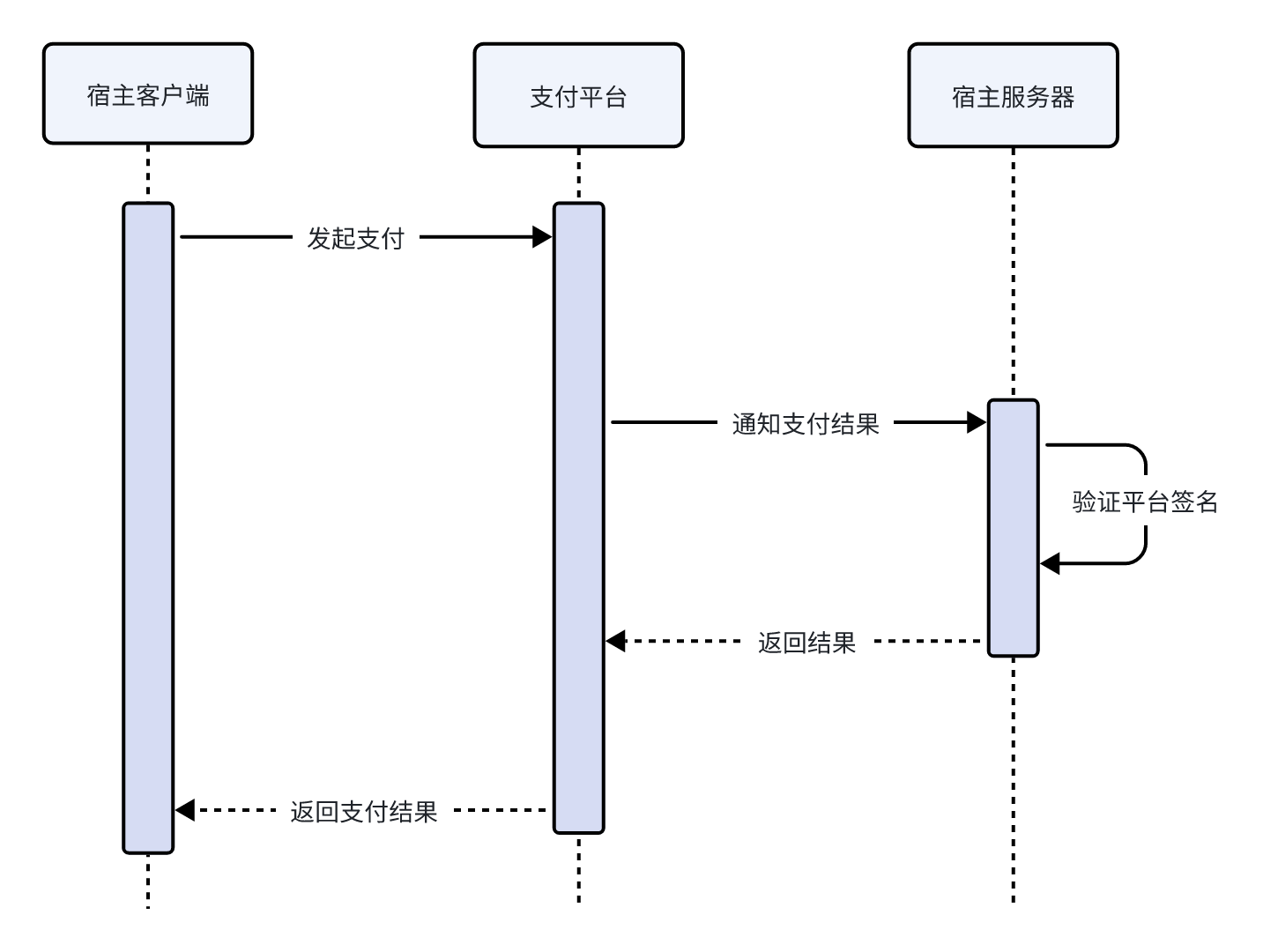
POST /game-api/v2/payment/callback
Host: minihost.tuanjie.cn
Authorization: Bearer {service_token}
Request Parameter Description:
| Parameter | Description |
|---|---|
| Authorization | Server token in the format Bearer {service_token} |
Request Body Description
{
  "appId": "appId", // Game ID
  "tradeNo": "tradeNo", // Transaction Number
  "cpOrderId": "cpOrderId", // Mini Game Order Number
  "amount": 1, // Payment Amount
  "count": 1, // Product Quantity
  "currency": "currency", // Currency Type
  "productCode": "productCode", // Product Code
  "productName": "productName", // Product Name
  "productPrice": 1, // Product Price
  "couponDeductAmount": 0, // Coupon Deduction Amount
  "extra": "extra", // Additional Information
  "nonce": "nonce", // Random String
  "sign": "sign" // Signature Information, refer to above signature rules
}
Response Body Description
{
  "code": 200, // Response Status Code
  "message": "message" // Status Code Description
}
Code Response Code Description
| Status Code | Description |
|---|---|
| 200 | Business processing successful, delivery successful |
| 22100 | Data signature incorrect |
| 22101 | Interface parameter validation failed |
| 22102 | Order failed (e.g., due to out of stock, product delisting, etc., clearly indicating that the order cannot be executed) |
| 22103 | Unknown business error |
2.2.3.3 Refund Notification API
POST /game-api/v2/payment/callback/refund
Host: minihost.tuanjie.cn
Authorization: Bearer {service_token}
Request Parameter Description:
| Parameter | Description |
|---|---|
| Authorization | Server token in the format Bearer {service_token} |
| Request Body Description |
{
  "appId": "appId", // Game ID
  "tradeNo": "tradeNo", // Transaction Number
  "cpOrderId": "cpOrderId", // Mini Game Order Number
  "refundNo": "refundNo", // Refund Number
  "refundAmount": 1, // Refund Amount
  "nonce": "nonce", // Random String
  "sign": "sign" // Signature Information, refer to above signature rules
}
Response Body Description
{
  "code": 200, // Response Status Code
  "message": "message" // Status Code Description
}
Code Response Code Description
| Status Code | Description |
|---|---|
| 200 | Business processing successful, refund processed successfully |
| 22100 | Data signature incorrect |
| 22101 | Interface parameter validation failed |
| 22103 | Unknown business error |
2.3 Login API
2.3.1 Login Process Overview
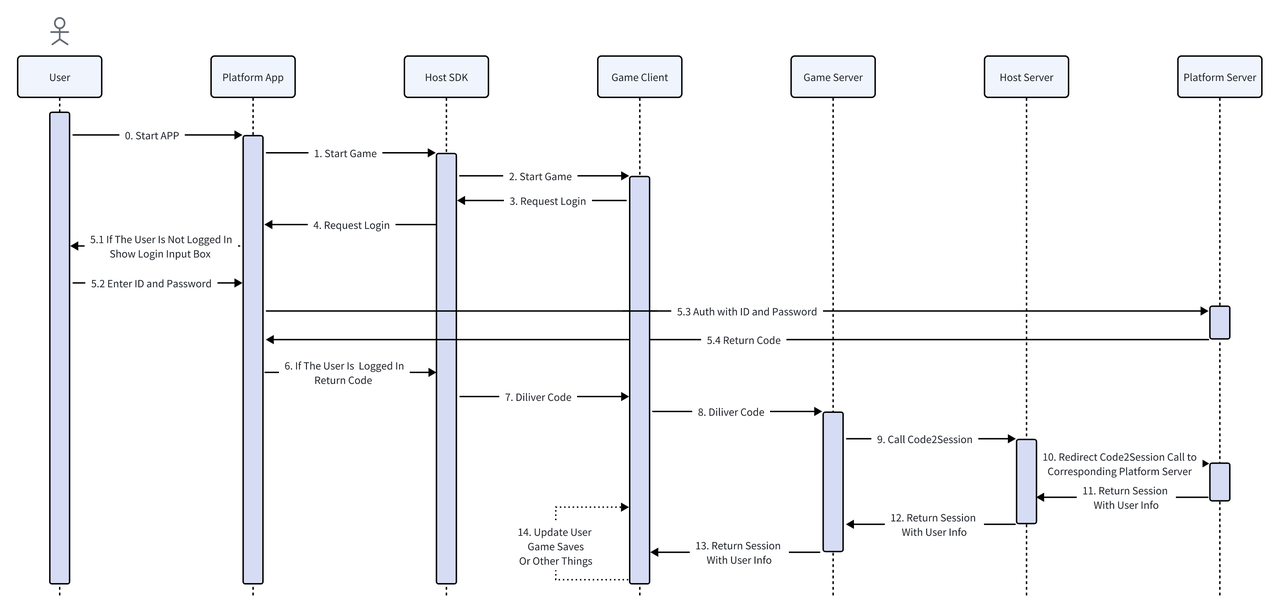
In the above diagram, the API that needs to be integrated by the platform is the code2session in Step 10.
2.3.2 Platform Code2Session
Provides the login capability of the platform. The host backend will pass the user's login credential (code) to the platform, which needs to return the user's login information based on this credential.
The host backend will map the uid returned by the platform to the openid and unionid available on the game side, based on the context of the request, and forward the session_key to the game side as a login credential.
Example of request:
GET /jscode2session?js_code={code} HTTP/1.1
Authorization: Bearer {service_token}
Request Parameter Description:
| parameter | Description |
|---|---|
| js_code | Platform Login Credentials |
| Authorization | Server token, formatted as Bearer {service_token} |
Response Example:
HTTP/1.1 200 OK
Content-Type: application/json

{
  "uid": "123456"
  "session_key": "abcdefg",
  "errcode": 0,
  "errmsg": "ok"
}
Response field description:
| Field | Description |
|---|---|
| uid | Unique user identifier returned by the platform |
| session_key | session_key returned by the platform |
| errcode | Error code, 0 indicates success |
| errmsg | Error Message |
2.4 Payment API
2.4.1 Payment Process Overview
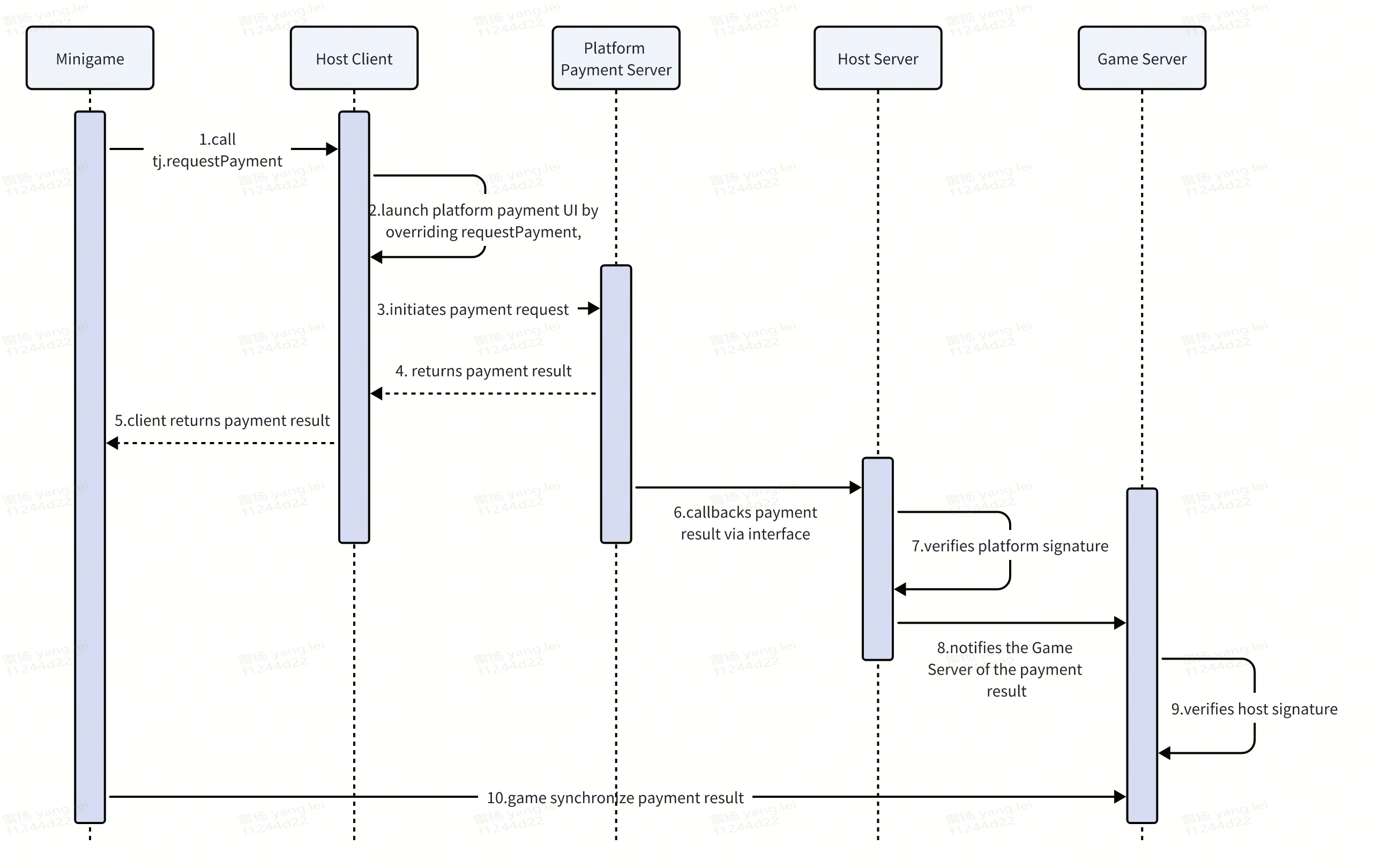
2.4.1.1 Minigame Payment
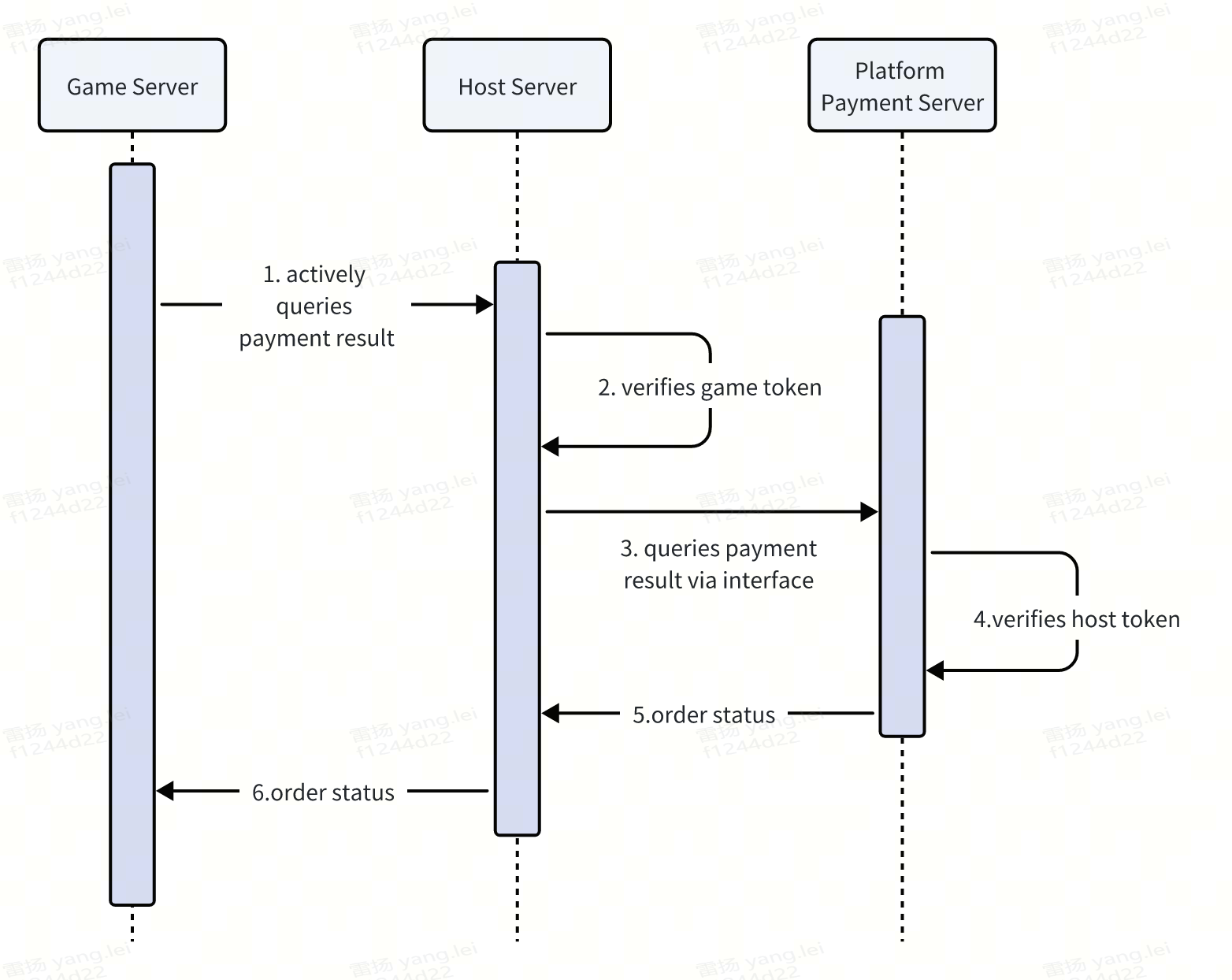
2.4.1.2 Game Servers Actively Query Order
2.4.2 Platform API in Minigame Payment
After the payment is successful, the platform server sends a payment success callback to the host server. After verifying the signature, the host server sends the callback to the game server. Align with Step 6 in the diagram above.
2.4.2.1 Callback Address
POST https://minihost.tuanjie.cn/game-api/v1/payment/callback
2.4.2.2 Request Parameters
| Parameter Name | Type | Description |
|---|---|---|
| timestamp | string | Timestamp |
| nonce | string | Random Number |
| msg | string | Payment result information of Json string type, see 2.4.2.3 PaymentInfo object |
| signature | string | Signature, see Section 2.4.2.4 Signature for the signature algorithm |
2.4.2.3 PaymentInfo
| Parameter Name | Type | Description |
|---|---|---|
| appid | string | Platform-side minigame appid |
| cp_orderno | string | Developer-defined order number, the customId parameter in the tj.requestPayment method |
| cp_extra | string | Extra parameters passed by the developer, the extra parameter in the tj.requestPayment method |
| order_no_channel | string | Minigame Backend Transaction Order Number |
| amount_cent | int64 | Order amount, in RMB cents |
| amount_coin | int64 | The quantity of game coins purchased is not involved in the platform's integration process and can be ignored. |
| currency | string | Payment currency, CNY Renminbi, DIAMOND Diamond |
2.4.2.4 Signature
Generate a signature using the SHA1 algorithm based on token, timestamp, nonce, and msg, and compare it with the signature returned by the platform's server.
Precondition: When associating a game, the platform party needs to pass token to the host for signature verification
Sample Golang code:
sortedString := make([]string, 4)
sortedString = append(sortedString, token)
sortedString = append(sortedString, timestamp)
sortedString = append(sortedString, nonce)
sortedString = append(sortedString, string(msg))
sort.Strings(sortedString)h := sha1.New()
h.Write([]byte(strings.Join(sortedString, "")))_signature := h.Sum(nil)
2.4.2.5 Response
The host server returns a 200 status code as a successful response. If the returned HTTP status code is not 200, it indicates that the notification has failed and a retry is required.
2.4.3 Platform API in Game Servers Actively Query Order
Server-side payment callbacks may fail to reach 100% due to reasons such as network anomalies. Developers can use this interface to actively check the order status to prevent over-delivery or under-delivery. Developers send a query order request to the host server, which then encapsulates and sends the query order request to the platform server. Align with Step 3 in the diagram above.
2.4.3.1 Interface Address
Provided by the platform
2.4.3.2 Request Parameters
| Parameter Name | Type | Description |
|---|---|---|
| token | string | The two parties agree on the server token |
| orderno | string | cp Custom Order Number, passed in when placing an order, the customId parameter in the tj.requestPayment method |
2.4.3.3 Response
| Parameter Name | Type | Description |
|---|---|---|
| status | string | Payment status. "success" indicates successful payment and coin arrival, "unsuccess" indicates payment failure |
2.4.3.4 Authentication
The request must include the server token agreed upon by both parties, placed in the Authorization header, with a format like
Bearer {service_token}