Payment Callback
Interface Description
The minigame-side payment flow is shown below:
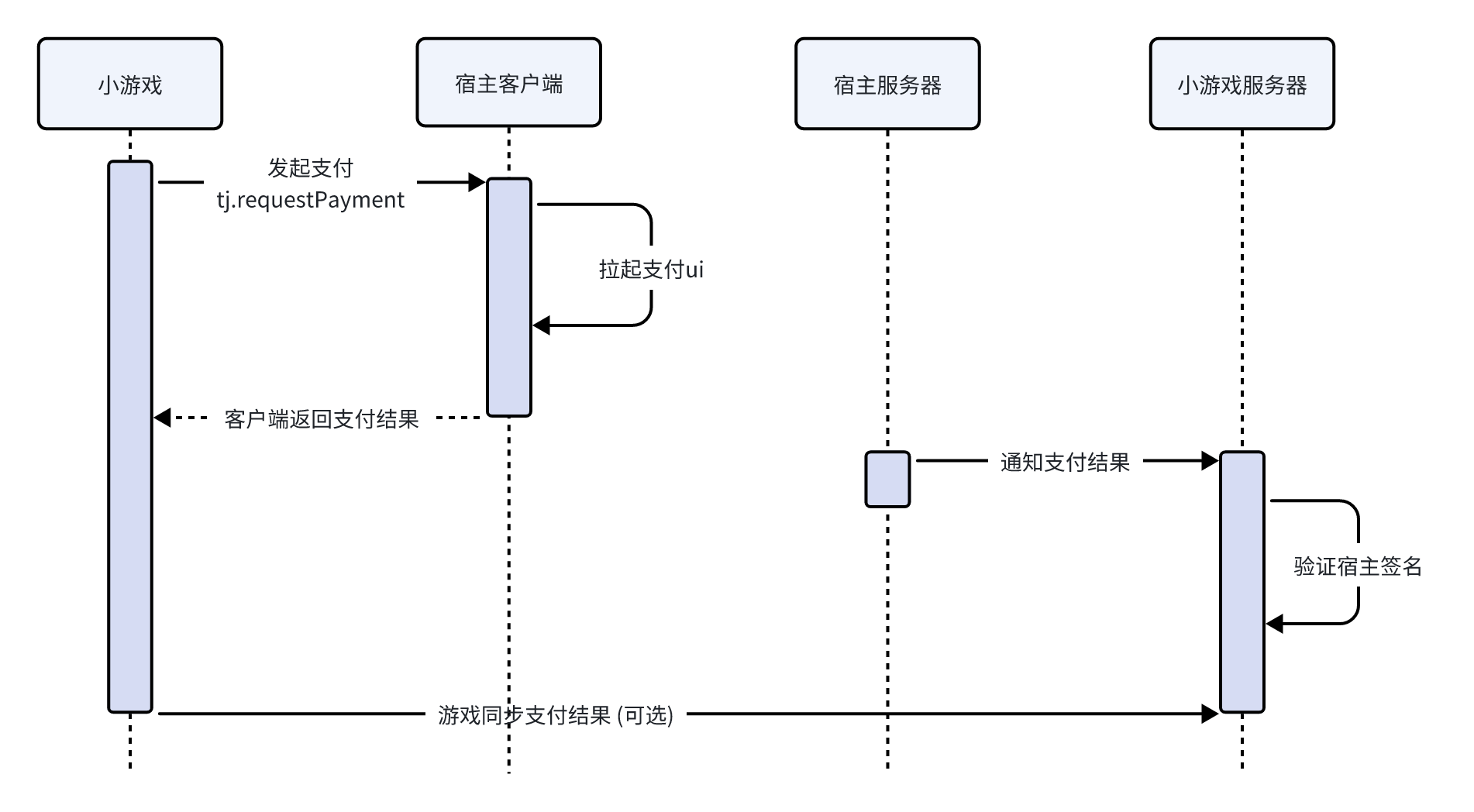
Payment Flow and Setup
Game Server Interface Accessibility Verification

⚠️ This section only explains how to test endpoint connectivity. For the actual payment callback behavior, see Host Server Callback Request.
To ensure the validity and security of the callback address, the host server sends a GET request to the callback address configured by the developer for accessibility verification. The request includes the echostr parameter. Developers need to verify that the request source is legitimate and return the echostr value as-is to complete the verification process.
Only after interface accessibility verification succeeds will the host server push payment order information to the configured callback address when the user completes payment. This callback is sent as a POST request.
Accessibility Verification Flow
Developers need to implement the following verification logic on the server side to confirm that the request indeed comes from the host server:
- Extract the verification parameters:
timestamp(timestamp),nonce(random string),msg(message content), andechostr(echo string) from the request. - Return the verification result: return the
echostrvalue from the request as-is.
Parameter Description
| Field | Type | Required | Description |
|---|---|---|---|
| timestamp | string | Yes | Timestamp |
| nonce | string | Yes | Random string |
| msg | string | Yes | Message content |
| signature | string | Yes | Signature string |
| echostr | string | No | Parameters used for interface accessibility verification |
Return Value Description
After the interface signature verification succeeds, directly return the original echostr string from the request parameters.
Response example:
pong
Golang Verification Example
type NotifyPayInfo struct {
	Timestamp string          `json:"timestamp"`
	Nonce     string          `json:"nonce"`
	Msg       string          `json:"msg"`
	Signature string          `json:"signature"`
	Type      OrderNotifyType `json:"type"`
	Echostr   string          `json:"echostr,omitempty"`
}

func TestPaymentPong(w http.ResponseWriter, r *http.Request) {
	data, err := io.ReadAll(r.Body)
	if err != nil {
		w.WriteHeader(http.StatusOK)
		_ = json.NewEncoder(w).Encode(map[string]any{
			"code":    22103,
			"message": "invalid body",
		})
		return
	}
	defer r.Body.Close()

	var body NotifyPayInfo
	if err := json.Unmarshal(data, &body); err != nil {
		w.WriteHeader(http.StatusOK)
		_ = json.NewEncoder(w).Encode(map[string]any{
			"code":    22103,
			"message": "invalid body",
		})
		return
	}

	w.WriteHeader(http.StatusOK)
	_, _ = w.Write([]byte(body.Echostr))
}
Actual Payment Callback Setup
After game server interface accessibility verification, the actual payment callback from the host server is sent via POST. The details are as follows:
Host Server Callback Request
The callback request includes a type field used to distinguish the request type.
Parameter Description
| Field | Type | Required | Description |
|---|---|---|---|
| timestamp | string | Yes | Timestamp |
| nonce | string | Yes | Random string |
| msg | string | Yes | Message content |
| signature | string | Yes | Signature string |
| type | string | Yes | Request type (payment or refund) |
Payment Callback Message Content
When the type field in the callback request is payment, msg contains the following content:
| Field | Type | Required | Description |
|---|---|---|---|
| appid | string | Yes | Mini game's Game ID |
| cp_order_no | string | Yes | Game order number |
| cp_extra | string | No | Custom pass-through parameter, can be used to pass additional information |
| channel_order_no | string | Yes | Channel order number, the unique transaction serial number generated by the host server |
| amount | int64 | Yes | Actual payment amount |
| quantity | int64 | Yes | Purchase quantity |
| currency | string | Yes | Currency type, such as CNY |
| coupon_deduct_amount | int64 | No | Coupon deduction amount |
| product_code | string | No | Product code |
| product_name | string | No | Product name |
| product_price | int64 | No | Product unit price |
Refund Callback Message Content
When the type field in the callback request is refund, msg contains the following content:
| Field | Type | Required | Description |
|---|---|---|---|
| appid | string | Yes | Mini game's Game ID |
| cp_order_no | string | Yes | Game order number |
| channel_order_no | string | Yes | Channel order number, the unique transaction serial number generated by the host server |
| refund_no | string | Yes | Refund number, the refund serial number generated by the host server when a refund occurs |
| refund_amount | int64 | Yes | Refund amount |
Callback Signature Verification
When the host server sends a payment callback request to the developer's server, the developer needs to verify the authenticity of the request to ensure data security. The verification process is as follows:
- Obtain
secret: get secret from the host platform game details page. - Obtain the verification parameters: extract
timestamp(timestamp),nonce(random string), andmsg(message content) from the request. - Generate the signature: sort
secret,timestamp,nonce, andmsgin lexicographical order, concatenate them into a string, and use the SHA1 algorithm to calculate the resultingsignature. - Verify the signature: compare the calculated
signaturewith thesignatureparameter from the request.
Golang Signature Verification Example
func GenerateSignature(secret, timestamp, nonce, msg string) string {
    sortedString := []string{secret, timestamp, nonce, msg}
    sort.Strings(sortedString)

    h := sha1.New()
    h.Write([]byte(strings.Join(sortedString, "")))

    return fmt.Sprintf("%x", h.Sum(nil))
}
Game Server Response
The game server needs to return the result to the host server in the following format. The host server will handle the callback differently based on the returned code.
Important note:
After the server receives the callback request, be sure to verify the amount to ensure that the received amount is consistent with the actual item amount. This prevents tampering that could lead to losses or data anomalies and helps protect in-game assets.
Response Description
| Field | Type | Description |
|---|---|---|
| code | int | Response status code |
| msg | string | Message content |
{
    "code"      :   200,       // Response status code
    "message"   :   "message"  // Status description
}
Code Description
| Status Code | Description |
|---|---|
| 200 | Business processing succeeded and delivery completed |
| 22100 | Data signature is invalid |
| 22101 | Request parameter validation failed |
| 22102 | Order failed (for example, no inventory or the item is no longer available), clearly indicating that the order cannot be fulfilled |
| 22103 | Unknown business error |