Cocos/Laya/Egret Adaptation Solution
Developers can quickly port their mini-games built with mainstream game engines such as Cocos, Laya, and Egret to the host platform by following our comprehensive adaptation solution. The host platform is now fully compatible with the WeChat mini-game runtime environment, allowing seamless migration by following these steps:
- Build WeChat Mini-Game: First, use your game engine to build a standard WeChat mini-game package.
- Process with Conversion Tool: Process the built WeChat mini-game package using the host-provided conversion tool.
- Run the Mini-Game: Once processing is complete, the mini-game can be run directly on the host platform.
With this adaptation solution, developers can efficiently migrate mini-games to the host platform, reducing development costs and improving efficiency.
1. Build WeChat Mini-Game
Currently, Cocos, Egret, and Laya have all completed adaptation and support for WeChat mini-games, providing detailed official documentation to guide developers in accessing mini-game development. Below are the official documentation links for each engine that developers can reference for building:
• Cocos Engine WeChat Mini-Game Official Documentation:
https://docs.cocos.com/creator/manual/zh/editor/publish/publish-wechatgame.html
• Laya Engine WeChat Mini-Game Official Documentation:
https://layaair.com/3.x/doc/released/miniGame/wechat/readme.html
• Egret Engine WeChat Mini-Game Official Documentation:
https://www.egret.uk/egretengine2d/
⚠️ Important Notice:
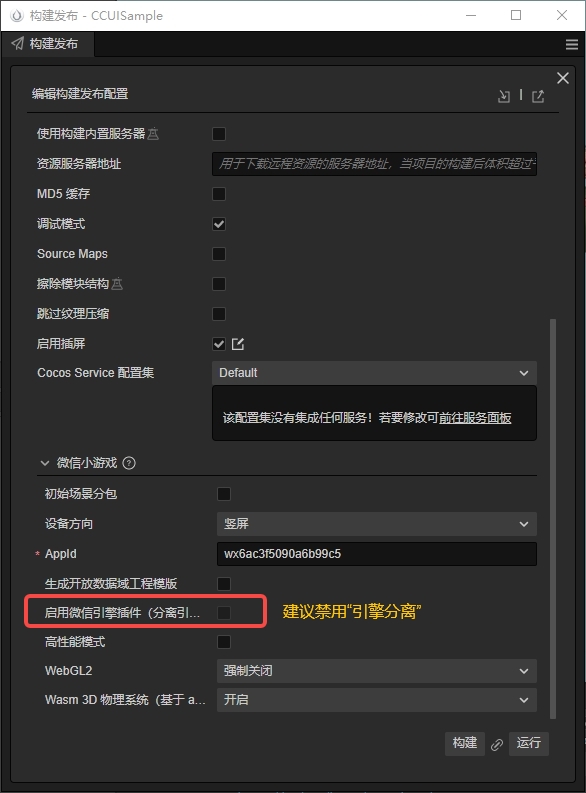
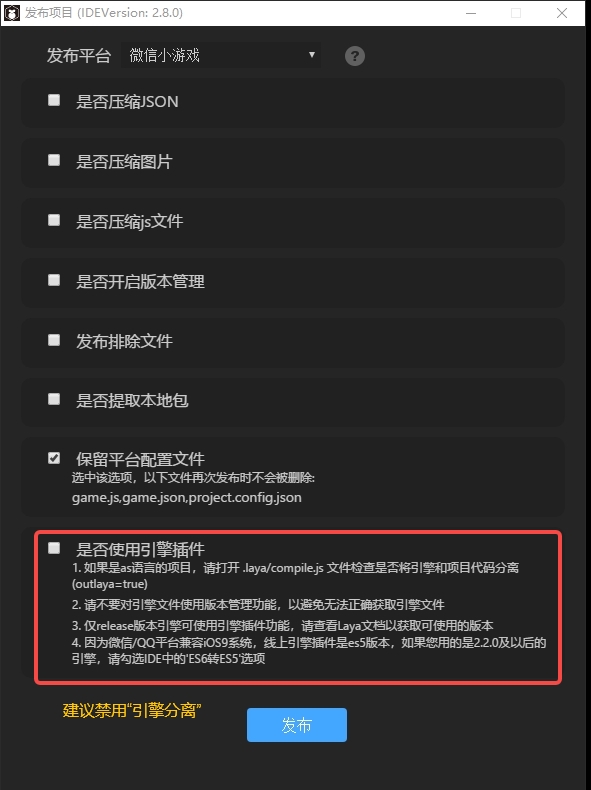
The host platform currently does not fully support the engine separation feature of Cocos, Laya, and Egret. Therefore, it is recommended that developers disable the engine separation feature for Cocos, Laya, and Egret.
Cocos Engine Separation
LayaAir Engine Separation
Egret Engine Separation (To Be Confirmed)
2. Using the Host's Conversion Tool
After packaging the game into WeChat mini-game format, we provide a conversion tool to quickly convert the WeChat mini-game package to a host-compatible format. Here are the specific steps:
-
Environment Setup: Ensure that Node.js and Python environments required by the conversion tool are installed and configured locally.
-
Execute Script: Using our provided conversion tool, run the following command:
python ./wx_converter.py -s /path/to/source/folder -t /path/to/target/folder-s: Specify the source folder path (i.e., the directory of the game package to be converted).-t: Specify the target folder path (i.e., the directory of the generated game package after conversion).
-
Generate Game Package: After execution is complete, a
game.zipfile that can run on the host platform will be generated in the target folder.
- Conversion Tool Address: https://github.com/UnityMiniHost/converter
- Detailed Instructions: Please refer to the conversion tool README for more detailed operation guidelines.